
During the November 12 Microsoft 365 disruption, users reported problems with Outlook and Teams. For IT teams that rely on those tools to communicate, the outage raises a practical question: If employees can’t reach you the usual way, how will they know where to get help or when to try working again? Coverage of the November 12 disruption and the incident discussion on Microsoft Q&A document the reported issues.
The cloud provider is responsible for restoring its service. Your IT team still has an incident to manage. Someone needs to work out which employees and business processes are affected, get the right responders involved, keep people informed, and verify that work can resume. The service desk is where much of that work comes together.
You don’t need to wait for the next outage to find out whether those handoffs work. Start by walking through what your team would do from the first sign of trouble to the first day back to normal. Use this exercise to test how your team identifies employee impact, routes reports, communicates off-channel, keeps essential work moving, and confirms recovery.
Get from “something’s wrong” to “here’s what’s affected”
Imagine the first ticket says, “I can’t send email.” That could be an issue with one account. Then another employee reports the same thing, someone says they can’t join a meeting, and a provider notice arrives. The first job is to determine what those signals tell you and what they don’t.
A provider notice tells you what the provider has acknowledged. Employee reports show which tasks people can’t complete. Monitoring gives you another point of comparison. For example, SolarWinds Observability SaaS can use synthetic monitoring, such as scheduled tests of configured websites, endpoints, or transactions, to check availability or see whether a monitored action completes. A failed check shows where your team is seeing a symptom. It doesn’t, on its own, tell you what failed inside the provider’s systems.
Decide how provider notices should reach the people who need to act on them. Microsoft 365 administrators can check Service health in the admin center, and Microsoft also maintains a public service health page. If a provider offers email notifications, you can configure a Service Desk email dropbox to create an incident from those messages, then use automation rules to route it to the right team. If you use a category-specific dropbox, its address can also help apply the right incident category and routing fields. Test the path in advance, especially if the notification address depends on the service you’re monitoring.
Give responders and service desk agents a common starting point
As reports come in, the people investigating the problem and the people answering employees need some of the same information. What symptoms are confirmed? Which services or groups appear affected? What has the provider said? What are we still checking? Put that information in the incident record so an agent can answer the next employee without reconstructing the investigation.
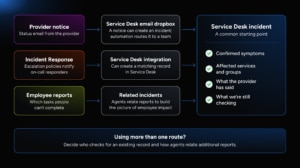
In SolarWinds Incident Response, escalation policies can notify on-call responders. With the inbound integration configured, an incident created in Incident Response creates a matching Service Desk incident.
Agents can also relate incidents in Service Desk, so individual reports can add to the picture of employee impact rather than being investigated in isolation.
The provider-email route and the Incident Response integration are two ways an incident can reach the service desk. If your team uses both, decide who checks for an existing record and how agents will relate any additional reports. You want the second signal to improve your understanding of the incident, not start a parallel response.
Make sure your updates can reach employees
If Outlook and Teams are both affected, sending another message in Outlook or Teams isn’t a fallback plan. And a separate status page or portal won’t help if employees can’t sign in to it. Test your alternate channel under the conditions it’s meant for: Can an employee reach it without the affected service, and do they already know where to look?
If your Service Desk plan includes runbooks, one can give agents a consistent process to follow. For a provider outage, the runbook could specify who drafts and approves updates, where to publish them, how often to check for new information, and where to send urgent reports of business impact.
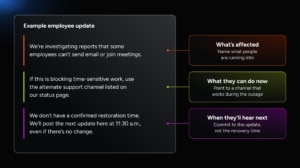
An update doesn’t need a root cause or a restoration estimate to be useful. It needs to tell employees what’s affected, what they can do now, and when they’ll hear from IT again. For example:
We’re investigating reports that some employees can’t send email or join meetings. If this is blocking time-sensitive work, use the alternate support channel listed on our status page. We don’t have a confirmed restoration time. We’ll post the next update here at 11:30 a.m., even if there’s no change.
Keep essential work moving without introducing a second problem
Ask agents to capture what the outage is preventing people from doing. “Email isn’t working” identifies a symptom. “We can’t send a time-sensitive customer notification” tells the response team what might need an alternative first. The goal is to identify where an approved alternative would make a difference and make sure agents know what they can share.
Some workarounds are procedural: use an existing alternate channel or follow a documented manual process. Others may require an internal configuration change. In that case, use your normal change management process to document the risk, obtain approval, check that the change worked, and plan how to reverse it. Your team doesn’t need to make a change simply because the provider is making one. Ask whether an internal change helps people continue essential work without creating another issue for the response team to manage.
Verify recovery from the employee’s side
A provider’s “resolved” update answers a question about its service. IT still needs to answer a question about its own organization: Can people do the work they couldn’t do earlier?
Start with the tasks employees reported as blocked. Ask representative users to retry them and use monitoring where you have relevant checks configured. If the original problem was sending email or joining meetings, test those activities rather than assuming that a successful sign-in is enough. Check whether any teams are still affected, whether temporary changes need to be reversed, and whether delayed work needs follow-up.
If your team uses the inbound SolarWinds Incident Response integration, resolving an incident in Incident Response also resolves its matching Service Desk incident. Decide who verifies employee recovery before that resolution is triggered and make that responsibility part of the handoff.
Once the immediate response is over, compare the timeline from the responders’ side with what the service desk saw. Did the provider notice reach the right people? How long did it take to update employees? Which guidance did agents have to write from scratch? Use what you learn to revise the runbook and update any knowledge articles employees and agents will rely on next time.
Run the exercise before you need the plan
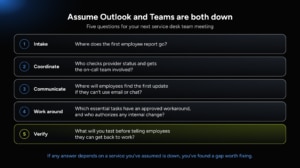
At your next service desk team meeting, assume Outlook and Teams are both unavailable, and the provider hasn’t given you a restoration estimate. Walk through where the first report goes, who coordinates the response, how employees will get updates, and what you’ll verify before telling people they can get back to work.
This is what operational resilience looks like at the service desk: knowing how to support employees even when the fix is in someone else’s hands.
To take this exercise beyond the service desk, read Operational Resilience: A Systems Approach to IT Management. The whitepaper looks at how observability, incident response, and service management fit together, and why the people and processes behind those tools matter.
If you’re evaluating tools for your service desk, start a free SolarWinds Service Desk trial and test one scenario from the exercise: Route a sample outage notice to the right team and connect related employee reports to a shared incident.