
A new employee starts Monday. Their laptop is ready, but software approval is buried in someone’s inbox. An urgent incident has already changed hands twice because the ticket didn’t include enough information. And the service desk manager’s pulling data from a spreadsheet to explain why requests are taking so long.
A basic ticketing tool can record the work. Your team still has to coordinate much of it. An enterprise platform offers more capabilities, but making them part of everyday use can become a substantial project in its own right.
Mid-market IT teams need a better balance: enough structure to improve service delivery, without an administrative workload they can’t reasonably support.
The buying decision comes down to fit. What work needs improving? Which capabilities will help? And can the people running your service desk maintain the platform alongside their other responsibilities?
When enterprise ITSM becomes more than your team needs
Enterprise tools aren’t overkill for every mid-market organization. Complex service dependencies and extensive governance requirements can justify a broader platform.
Company size alone, though, doesn’t settle the question. The proposed implementation needs to match your operating requirements and the resources available to support it. The goal is not to choose the smallest platform or the most powerful one. Choose the platform your team can put to work and maintain over time.
How to avoid buying more ITSM than you can use
Product demonstrations tend to emphasize what a platform can do. They spend less time on the work required to keep it useful.
Start with one real workflow
A platform evaluation can quickly become a wish list. Someone wants a larger service catalog. Another department sees an opportunity to add its requests. More requirements enter the plan, and the original service desk problem gets pushed further down the schedule.
Our Ultimate Guide to ITSM Maturity recommends choosing one discipline and implementing a specific capability before trying to advance across every area. It also warns against overengineering incident categories and building an extensive service catalog too early.
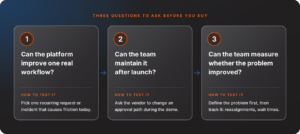
Start with one recurring request or incident that creates measurable friction today. For example, you might focus on routing access requests to the right team, reducing approval delays, or giving agents the asset context they need to troubleshoot more efficiently.
Broader capabilities can stay on the roadmap without becoming launch requirements. A smaller first phase gives your team a better chance of showing measurable progress before expanding the implementation.
The same principle applies to governance. A routine, low-risk request does not need the same approval process as a change affecting a critical business service. Look for a platform that lets your team preserve meaningful controls without sending every request through the most elaborate process available.
Test what happens after launch
Product demonstrations tend to emphasize what a platform can do. They spend less time on the work required to keep it useful.
Ask the vendor to change an approval path during the demonstration. Have them add an approver, update a routing rule, or adjust a request form. Find out who can make the change, how it will be tested, and whether it requires specialist support.
A finished workflow tells you what is possible. Watching someone modify it tells you more about what your team will have to manage.
Include that ongoing effort in the cost assessment alongside subscription charges, asset pricing, migration, training, and external implementation support. Every ITSM implementation requires some maintenance. The question is whether the effort is proportionate to the service improvement it delivers.
Use the same scenarios with every vendor
Bring your own work to the demonstration, including the parts that do not go smoothly. Give each vendor the same recurring request and representative incident so you can compare how the platforms handle them.
Follow the request from submission through fulfillment:
- What information does the employee need to provide?
- Where does the request go, and who approves it?
- How does the process handle an unavailable approver?
- Can the employee check progress without contacting IT?
For the incident, examine how agents access asset context, collaborate on the ticket, and identify an approaching service-level breach.
Measure whether the problem improved
Define the problem before you configure the solution. If the issue is poor routing, measure reassignment rates. If approvals are slow, measure wait times. If employees repeatedly ask for updates, track status-related contacts.
Give each process an owner who can review the results and make adjustments. A platform should not only capture activity. It should help your team understand whether service is improving.
Why basic ticketing can leave you short
Avoiding unnecessary complexity doesn’t mean keeping a tool your team has outgrown.
Basic ticketing provides a useful starting point. Requests enter a shared queue, agents can track ownership, and managers can see outstanding work. The limitations become clearer as a request moves beyond intake.
Consider employee onboarding. A ticket captures the new hire’s name and start date, but fulfilling the request involves equipment assignment, access approvals, and work owned by different people. Agents may spend much of their time checking whether someone else has completed a task.
A broken laptop creates a different challenge. The agent needs device information and incident history. A separate asset spreadsheet adds another place to search before troubleshooting can begin.
Our ITSM maturity guide describes the progression beyond centralized tracking, including automated routing, service-level targets, asset context, and distinct workflows for service requests.
Those needs show up in everyday work:
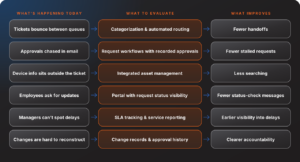
These capabilities support the progression from capturing work to standardizing how it gets done.
Pay attention to how much coordination happens outside your current tool. An approval recorded only in email or a task tracked in someone’s personal spreadsheet represents work the service desk can’t easily oversee.
What mid-market teams should look for in an ITSM tool
A practical middle ground is not defined by the number of features a platform offers. It is defined by whether the platform helps your team remove operational friction without creating more work to manage.
Look for capabilities that improve a specific problem, produce a measurable outcome, and can be maintained by the people already responsible, reducing manual coordination that slows requests.
Service and asset information that work together
Agents need relevant context without having to reconstruct it for each incident. During an evaluation, examine how the platform connects tickets with asset records and how those connections support troubleshooting.
SolarWinds Service Desk supports asset-incident correlation and configuration management capabilities for understanding relationships between configuration items. Those relationships can also inform change impact analysis.
Go beyond checking whether an asset management feature exists. Have an agent use it. Can they identify the affected device and review its issue history? Does the information help them decide what to do next? The payoff is less time spent searching for context and more time spent diagnosing and resolving the issue.
Be selective about the data you collect, too. Our maturity guide recommends tracking information that supports decisions rather than filling every available field.
Workflows your team can maintain
Start automation with a manual step that’s causing a known delay. Routing an access request to the responsible team or sending an approval to the appropriate manager gives you a concrete use case to test.
Watch the workflow run, then change it. Have your administrator add an approver or update the routing rule. The evaluation should reveal how much effort routine maintenance takes. The goal is not automation for its own sake. It is to reduce the manual coordination that slows requests down while giving your team a workflow it can adjust as processes change.
SolarWinds Service Desk supports workflow automation for routing work, sending notifications, and managing approvals. Capabilities vary by plan, so match your requirements to the relevant tier before building the business case.
Self-service employees will actually use
A portal gives employees a place to request services and track progress. A knowledge base can help them resolve issues without waiting for an agent. Neither becomes useful simply because it’s been published.
Our maturity guide emphasizes promoting the portal and helping employees move away from email-only habits. It also identifies an accurate, maintained knowledge base as a prerequisite for helpful AI-powered suggestions.
Begin with the questions and requests your team handles most often. Make those paths easy to follow and use employee feedback to improve them. A smaller catalog that helps people complete common tasks is a better starting point than a long menu they struggle to navigate. When self-service works, employees get answers and request updates without creating additional work for the service desk.
Reporting that helps you find the hold-up
Build reporting requirements around the questions your service desk manager needs to answer.
Where are requests waiting? Which categories repeatedly miss service-level targets? Are recurring incidents tied to a particular asset?
SolarWinds Service Desk provides service-level management and reporting capabilities, with scheduled reports and other advanced features available in specified plans.
Use representative data during the evaluation. A report should help the team identify something worth investigating or changing. An attractive dashboard alone doesn’t establish its value. The value of reporting is not the dashboard itself. It is helping the team identify where work is waiting and what needs to change.
Where SolarWinds Service Desk fits
SolarWinds Service Desk is built for teams that have outgrown shared queues but do not want service management to become another full-time administration project.
Teams can start with core incident and service request workflows, then expand into automation, asset management, configuration management, and enterprise service management as their needs develop. The goal is to improve one area of service delivery first, not activate every capability at once.
For mid-market teams, the value comes from connecting work that is often fragmented across tickets, email, spreadsheets, and separate systems:
- Connect service work to context: Bring incidents, assets, configuration items, and dependencies together, so agents have more information when they need to investigate and resolve an issue.
- Standardize repeatable work: Use routing, approvals, notifications, and workflows to reduce manual handoffs and create more consistent service delivery.
- Improve visibility: Use service-level targets, reporting, and service data to identify where requests are waiting and where processes need to change.
SolarWinds Service Desk provides these capabilities on a cloud-based platform, with configuration tools that allow teams to adapt workflows, forms, approvals, and notifications as their processes change.
Plan selection still matters. Essentials, Advanced, and Premier provide different levels of automation, reporting, AI, asset management, and configuration-management capabilities. Match the capabilities needed for your first workflow to the appropriate plan, and account for asset pricing, configuration work, and any implementation support in the business case.
The best-fit platform is not the one with the longest feature list. It is the one that helps your team improve a real service outcome and continue improving it after launch.
Give AI a specific job
AI deserves the same scrutiny as any other capability. Choose a task it can support and measure the result.
In an observational before-and-after analysis of SolarWinds customer data, average elapsed incident resolution time was 27.42 hours before GenAI feature enablement and 22.55 hours afterward among organizations using the features, a 17.8% relative difference. The analysis included organizations on the Premier plan.
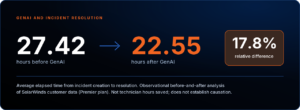
The measurement covers elapsed calendar time from incident creation to resolution, not technician labor hours saved. The analysis does not establish that GenAI alone caused the change, and differences in workflow practices or other factors may also have contributed.
For your evaluation, start with a defined task, such as drafting an incident response or generating a summary. Review the output and track its effect on the workflow before expanding its use.
Choose the platform your team can put to work
Mid-market IT teams may need strong service management capabilities without enterprise-scale implementation. They can also outgrow basic ticketing well before they have the resources to maintain a heavily customized platform.
Evaluate the work your team needs to improve alongside its capacity to maintain the solution. Keep controls that serve a clear purpose, and question steps that add effort without improving service. The best-fit platform is the one that helps your team improve a real service outcome, not simply add another layer of technology.
Use the SolarWinds Service Desk 30-day free trial to test a real workflow from your environment. Follow the request through the process, review what the agent can see, and have your administrator make a routine change. You’ll get a clearer view of how the platform fits your team’s daily work.