
In the first post, we explored what it takes to turn a vulnerability finding into verified remediation. Urgent patching puts that workflow under pressure, particularly when teams need to change production systems before a normal maintenance window.
When a critical vulnerability is actively exploited, teams can’t afford to wait for a routine maintenance cycle. They also can’t afford to cause an outage, break a critical integration, or lose track of changes while trying to reduce exposure.
Urgent remediation creates a difficult operational problem: security teams need speed, while IT operations teams need enough context and control to change production systems safely. IT change management gives teams a way to manage that tension through documented planning, approvals, implementation, validation, and review.
This post continues our Cyber Resilience in Service Management series. We’ve covered the last mile of vulnerability remediation and the role of CMDB data in security decisions. Now we’ll look at the moment where those disciplines meet: the production change required to patch, reconfigure, isolate, upgrade, or otherwise reduce risk.
Plan for the service impact of urgent patches
“Patch faster” is good advice until it becomes the entire plan. A patch may require a restart. An update may change a library version and break an application dependency. A configuration adjustment may interrupt a shared service. An urgent firewall rule may block legitimate traffic. A compensating control may buy time, but it can also create workarounds that need active monitoring and a defined expiration date.
Security teams know the cost of delay. Threat actors can move quickly after public disclosure, proof-of-concept release, or confirmed exploitation. CISA’s Federal Government Cybersecurity Incident and Vulnerability Response Playbooks, written for Federal Civilian Executive Branch agencies, describe a coordinated process to identify, evaluate, remediate, recover from, and track vulnerabilities. Although the playbooks are designed for federal agencies, they can also serve as a useful reference for other organizations.
For actively exploited vulnerabilities, the playbook says remediation will usually involve patching. When a patch is unavailable, untested, or cannot be applied promptly, teams may need to limit access, isolate vulnerable systems or services, disable services, reconfigure firewalls, or increase monitoring.
Operations teams know the cost of a rushed production change. An untested patch can create service disruption. An undocumented mitigation can leave teams unable to explain why an integration stopped working. An emergency fix that bypasses all review can create configuration drift, incomplete rollback planning, and more work during the next incident.
Both concerns are valid. The answer is a faster, risk-appropriate change path.
Security remediation is often a production change
Many vulnerability findings can be addressed through familiar operational work:
- Applying a vendor patch or hotfix
- Updating an operating system, library, container image, or application component
- Changing a configuration setting
- Removing unsupported or unauthorized software
- Disabling an unnecessary service
- Restricting access through a firewall, network policy, or identity control
- Isolating an affected asset
- Rotating credentials, keys, or certificates
- Replacing or retiring unsupported infrastructure
- Applying a temporary compensating control while a permanent fix is planned
Each action changes something in the environment. Even a “simple” patch can affect availability, performance, integrations, authentication, backup processes, monitoring, or user workflows.
That’s why vulnerability remediation benefits from the same structured thinking used for any consequential production change:
- What is changing?
- Why is the change necessary now?
- Which assets, services, users, and dependencies could be affected?
- Who owns the technical implementation?
- Who can assess service impact?
- What testing can happen before and after the change?
- What is the rollback plan?
- How will the team know the vulnerability is resolved?
- How will the team know the service is still healthy?
- Who needs to be notified?
- What evidence should be retained?
These questions can help teams make faster decisions with fewer avoidable surprises.
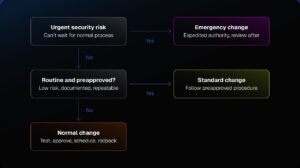
SolarWinds Service Desk supports ITIL-aligned change processes with reusable Change Catalog Items, change, test, and rollback plans, approvals, tasks, related configuration items, and a change calendar. Automated notifications through the Send Notifications feature are available to Advanced and Premier customers. When teams connect change work to the relevant assets, incidents, and services, they have more context before an urgent remediation reaches production.
Use the right change path
Not every security-related change needs the same process. A routine patch for a managed endpoint group shouldn’t sit in a lengthy approval queue. A change that affects a customer-facing payment application deserves more analysis and coordination. An actively exploited vulnerability may require action before a normal review cycle can occur.
A practical model separates remediation work into standard, normal, and emergency changes.
|
Change type |
When it fits |
Typical examples |
Essential controls |
|
Standard change |
The work is routine, low risk, repeatable, documented, and preapproved |
Monthly endpoint patching, removing a known unauthorized application, applying an established configuration hardening baseline |
Defined procedure, preauthorization, scoped target list, implementation record, validation |
|
Normal change |
The work has a meaningful service impact, needs testing, affects dependencies, or requires scheduled coordination |
Updating a production application library, patching a shared database platform, changing an authentication integration |
Impact analysis, owner review, test plan, scheduled window, approval, rollback plan, validation |
|
Emergency change |
The organization faces active exploitation, imminent severe risk, or an urgent security event that can’t wait for the normal process |
Disabling an exposed vulnerable service, isolating a compromised host, applying an urgent mitigation, blocking a malicious IP range |
Expedited authority, defined scope, minimal viable documentation, implementation evidence, validation, retrospective review |
The path should reflect the risk of both acting and not acting.

An emergency change doesn’t mean “no process.” It means the organization has an expedited process designed for conditions where delay creates unacceptable risk. Teams still need to document what happened, who authorized it, what systems were affected, how the change was validated, and what follow-up work is required.
The SolarWinds ITSM Maturity Guide makes the same practical distinction. It recommends using standard changes for low-risk, repeatable work rather than routing every routine patch through a full Change Advisory Board review. It also recommends fast-tracking critical changes when necessary while using CMDB information to assess impact.
Make emergency changes fast and traceable
An emergency change process should reduce friction without discarding accountability.
During an urgent vulnerability response, teams rarely have time to prepare a long formal plan. They do have time to capture the information that lets other people understand the decision, support the implementation, and review the outcome afterward.
A lightweight emergency change record should include:
|
Record element |
Why it matters |
|
Vulnerability or threat reference |
Connects the action to the reason for urgency |
|
Affected asset, CI, service, or asset group |
Defines the scope and supports later investigation |
|
Exposure and urgency rationale |
Explains why the normal change process wasn’t appropriate |
|
Change owner and implementing team |
Establishes who is responsible for the work |
|
Technical and service owners |
Brings in the people who understand the system and business impact |
|
Planned action |
Captures what will change, even if the plan is concise |
|
Start time and expected duration |
Helps coordinate communications and assess risk |
|
Rollback or restoration approach |
Gives teams a path if the mitigation causes an outage or unexpected behavior |
|
Validation method |
Defines how the team will confirm both security remediation and service health |
|
Approval or authorization record |
Shows who accepted the operational tradeoff |
|
Communications plan |
Identifies affected teams, service owners, and stakeholders |
|
Follow-up actions |
Captures testing, permanent remediation, documentation, and retrospective review work |
Teams should create these records before implementation whenever possible. In a true urgent situation, the initial record may be brief and updated as facts become clear. The important point is that the change enters the system of record quickly enough to preserve context.
SolarWinds Web Help Desk provides change management and approvals, including customizable workflows that support single-approver and multi-level approval chains. It can help teams track change requests, approvals, and work history in one place.
Organizations that need broader ITSM context can use SolarWinds Service Desk change management capabilities to connect changes with configuration items, incidents, tasks, approvals, notifications, and service-management workflows.
Develop your change path by leading with impact, not fear
A critical vulnerability can create understandable pressure. Pressure can also lead teams to overcorrect by treating every high-severity finding as if it requires the same immediate response. Severity is important, but it doesn’t give the entire picture.
Before choosing a change path, teams should consider:
- Is the vulnerability known to be actively exploited?
- Is the affected service or asset internet-facing?
- Does public proof-of-concept code exist?
- Is the vulnerable component present and reachable in the organization’s environment?
- Does the system process sensitive data or support a critical business function?
- Are compensating controls already in place?
- Is a patch available, tested, and compatible with the environment?
- What is the likely impact of implementation or a failed implementation?
- Does the affected service have a scheduled maintenance window?
- Is the system already scheduled for replacement, retirement, or a planned upgrade?
- Can the team isolate the asset, block access, or increase monitoring while preparing a permanent fix?
CISA’s vulnerability-response guidance describes a similar approach. Teams should determine whether a vulnerability exists in their environment, understand the criticality of the affected software or hardware, evaluate whether it has been exploited, and use mitigations such as limiting access, isolating systems, disabling services, changing configurations, or increasing monitoring when immediate patching isn’t possible.
This is a risk decision, not a race to close a ticket.
The goal is to reduce meaningful exposure as quickly as possible while protecting the service from unnecessary disruption. Sometimes that means an emergency patch. Sometimes it means a short-term mitigating change while the team schedules and tests the permanent fix.
Build standard changes before the next urgent patch
The best time to design an emergency process is before an emergency. The same goes for standard changes.
Teams can reduce future remediation time by identifying predictable patching and hardening work, then creating preapproved procedures for it. A standard change should have a known scope, a documented implementation plan, a defined validation approach, and clear conditions under which the team must stop and escalate.
Good candidates for standard changes may include:
- Routine operating system patches for a defined endpoint population
- Approved browser or productivity-suite updates
- Removing software that violates an established policy
- Updating endpoint protection signatures or configurations
- Rotating credentials using a documented, tested procedure
- Applying a well-understood configuration baseline
- Disabling known-unnecessary services on a standard system type
- Patching a defined class of nonproduction systems
- Deploying a previously tested update to an approved device group
Standard changes should not become a shortcut for work with unknown impact. A patch that touches a shared production service, a critical application dependency, or a unique legacy platform may still need normal or emergency change handling.
Teams should periodically review their standard-change catalog. If a “routine” patch generates repeated incidents, fails validation, or requires unplanned rollback, it may no longer qualify as a low-risk, repeatable change.
This is where problem management can help. Repeated patch failures, recurring configuration drift, or persistent vulnerability findings may point to a deeper cause: unsupported software, an unreliable dependency, inadequate testing, missing asset data, or a weak deployment process.
Use service context to avoid change collisions
A remediation change may be technically sound and still create disruption if it lands at the wrong time.
Teams can avoid many preventable problems by asking questions that go beyond the affected server or application:
- Does another team have a change planned for the same service or user group?
- Does the business have a seasonal event, close period, payroll run, customer launch, or regulatory deadline?
- Is the change window compatible with vendor support availability?
- Do downstream systems need to be tested after the change?
- Does the service depend on a shared identity platform, database, network component, certificate authority, or third-party API?
- Are backup, monitoring, logging, and alerting systems ready to confirm the result?
- Does an existing incident or degraded service condition make the change riskier?
A CMDB can help teams understand the relationships among configuration items, services, incidents, problems, and changes. A change calendar can help teams spot timing conflicts before they affect the same users or services.
The Ultimate Guide to ITSM Maturity highlights change collision as a common failure point. Two changes may not conflict in code or infrastructure design, but they can still affect the same user group at the same time and create unnecessary disruption. The guide recommends using change calendars and reporting to identify and track those conflicts.
Security remediation doesn’t happen outside the normal operating environment. The same business calendar, service dependencies, staffing constraints, and customer expectations still apply.
Validate both security and service health
A team may successfully apply a patch and still fail to complete the remediation.
Validation needs to cover two outcomes:
- The security issue is addressed.
- The service continues to work as expected.
Security validation may include a follow-up vulnerability scan, a software-version check, confirmation that a vulnerable configuration was removed, or evidence that an access restriction is enforced.
Operational validation may include application tests, synthetic transactions, endpoint health checks, database connectivity tests, log review, monitoring verification, and confirmation from the service owner or business stakeholder.
The exact test depends on the change. A patch to a customer-facing web application may require authentication, transaction, API, and performance checks. A firewall rule may require validation that malicious access is blocked while approved traffic still flows. A configuration hardening change may require service restart checks and monitoring review.
Teams should define validation before implementation, particularly during high-pressure emergency work. Without a clear validation plan, people tend to stop when the deployment command succeeds. That can leave a patched system that no longer serves users, a mitigation that doesn’t fully reduce exposure, or a workaround that becomes permanent by accident.
An service level agreement (SLA) can help operational teams set response and follow-up targets for remediation work. It should complement, not replace, risk-based prioritization and any security-specific deadlines.
Review emergency changes while the details are fresh
Emergency changes should end with a review, not simply a closure code.
The review doesn’t need to be punitive. Teams should use it to learn whether the process helped them reduce risk safely and where it created avoidable friction.
Useful questions include:
- Was the urgent change justified by the level of exposure?
- Did the team have accurate asset, ownership, and service context?
- Did the right people receive the right information in time?
- Did the implementation follow the documented plan?
- Did the rollback plan exist, and was it usable?
- Did the validation confirm both security remediation and service health?
- Did the mitigation introduce new issues or configuration drift?
- Could a standard change, tested runbook, or improved asset record make future work faster?
- Is there a longer-term remediation task still open?
- Does a repeated issue need a problem record, lifecycle decision, or knowledge article?
Configuration drift can develop when undocumented or unauthorized changes gradually move systems away from their intended state. Over time, that can create operational inefficiency and security risk. A retrospective review helps teams capture emergency changes before they turn into undocumented conditions that nobody remembers six months later.
The same review can identify where the organization needs more maturity. Maybe it needs a better asset inventory. Perhaps the CMDB is missing critical dependencies, the standard-change catalog doesn’t cover the work teams perform most often, the patch testing needs more automation, or business owners need a clearer escalation path.
Each review should produce a short set of follow-up tasks with assigned owners and target dates. The work only improves if the lessons make it back into the operating model.
Move quickly with a documented repeatable process
Urgent remediation will always involve tradeoffs. Security teams need to reduce exposure before attackers can take advantage of it. IT operations teams need to protect service continuity while changing complex environments under pressure.
A well-designed change process helps both teams move faster because it reduces uncertainty.
Start with these questions:
- Do we have clear criteria for standard, normal, and emergency security-related changes?
- Can teams rapidly identify the affected asset, service, owners, and dependencies?
- Does every emergency change capture the reason for urgency, the scope, the authorization, the action, and the validation plan?
- Do we have preapproved procedures for routine patching and hardening work?
- Can teams identify potential change collisions and business timing conflicts?
- Do we validate both vulnerability closure and service health?
- Do we review emergency changes and turn lessons into updated procedures, knowledge, or problem records?
If the answer is no to several of these questions, the next improvement may not be a faster patching tool. It may be a more practical change management process, better configuration context, or a central workflow that helps teams coordinate urgent work without losing control of the environment.
In the next post, we’ll turn from remediation to response: why a security alert isn’t yet a coordinated incident response, and how service context helps teams move from detection to action.