

Finding a vulnerability matters. Closing it safely, confirming the fix worked, and preventing the same weakness from returning is where the harder work begins.
A scanner can flag a missing patch on a server. It usually can’t tell the team who owns that server, which business service depends on it, whether a maintenance window is available, which systems could be affected by a restart, or whether the remediation was completed and validated. Those questions turn vulnerability management into an operational discipline rather than a security-tool workflow.
This is our first post in the Cyber Resilience in Service Management series. We’ll look at the service management practices behind security work that must happen in real environments: asset context, service ownership, change control, incident coordination, recovery planning, and continuous improvement.
The premise is simple: Security teams need strong detection and prioritization. They also need reliable ways to turn findings into completed, accountable work.
Discovery doesn’t equal remediation
A vulnerability assessment identifies and evaluates security weaknesses at a point in time. Vulnerability management is the ongoing process of identifying, prioritizing, treating, validating, and monitoring those weaknesses.
The difference matters because scan results don’t resolve anything on their own.
Picture a common scenario. A scanner reports a critical vulnerability on a production system. The security team creates a ticket. Then the work begins:
- Is the asset active, or is the inventory record stale?
- Is it externally exposed, internally accessible, or isolated?
- Who owns the operating system, the application, and the service it supports?
- Are compensating controls already in place?
- What systems, integrations, or users could be affected by the remediation?
- Can the work follow a routine patch process, or does it require an emergency change?
- Who will confirm the application still works afterward?
- What happens if the remediation deadline passes?
Those questions are critical because they address the day-to-day mechanics of reducing risk without causing an outage or losing track of the work.
CISA guidance on asset inventory recommends maintaining asset data across the lifecycle and using it with vulnerability information to prioritize risk and manage remediation. Although written for operational technology owners and operators, CISA’s asset-inventory guidance reinforces a broader principle: maintain accurate asset data throughout the lifecycle and connect inventory context with vulnerability information to prioritize risk and manage remediation. NIST Cybersecurity Framework 2.0 also connects asset management to broader risk management, incident response, and recovery practices.
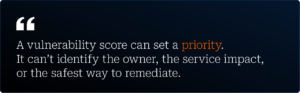
Security teams don’t only need more findings. They need enough operational context to make the right finding actionable.
Start with decision-ready asset data
A list of hostnames or device serial numbers won’t support effective vulnerability remediation. Teams need asset data that helps them decide what to do next.
IT asset management helps organizations track, evaluate, and maintain hardware, software, cloud resources, licenses, and other technology assets throughout their lifecycle. During remediation, its value comes from the context attached to the asset record.
A remediation-ready asset record should help answer these questions:
|
Data needed |
Why it matters during remediation |
|
Asset type and technical details |
Confirms whether the finding applies and identifies the team that can address it |
|
Current status |
Helps teams separate active systems from retired, duplicate, or stale records |
|
Technical owner |
Identifies the team responsible for patching, configuration, and technical validation |
|
Service or business owner |
Clarifies the business impact of downtime, deferral, or a failed change |
|
Environment |
Distinguishes production systems from development, testing, and lab assets |
|
Business criticality |
Supports prioritization beyond a vulnerability severity score |
|
Network exposure |
Helps assess reachability and potential attacker access paths |
|
Related service or application |
Connects the asset to the business capability it supports |
|
Dependencies |
Shows which downstream systems, integrations, and users could be affected |
|
Previous incidents or changes |
Adds context about instability, known workarounds, or failed remediation attempts |
ITAM and CMDB in vulnerability remediation
Asset management and a configuration management database (CMDB) serve different purposes during remediation. ITAM helps manage the lifecycle of technology assets. A CMDB documents configuration items and the relationships among hardware, software, services, and other components in the environment.
Those relationships can support change-impact analysis, troubleshooting, incident management, and root-cause analysis.
For example, a critical vulnerability on a web server may deserve immediate attention. But the team still needs to know whether it supports a revenue-generating application, relies on a shared identity service, or has a history of failed patching attempts. The remediation plan may involve application testing, a defined maintenance window, a rollback plan, and monitoring after the change.
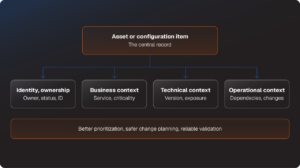
SolarWinds Service Desk can help teams connect asset discovery and management with configuration items, incidents, problems, and changes. That gives teams a way to move from “a vulnerable device exists” to “this service has an accountable owner, known dependencies, a documented remediation plan, and evidence of closure.” Discover how SolarWinds Service Desk can help your team track and inventory assets with a demo.
Ownership keeps work moving
Many remediation delays look like patching problems on the surface. Ownership gaps often sit underneath them.
A security team may know an asset has a serious vulnerability but not know who can approve downtime, apply the fix, test the application, or accept a temporary exception. A technical owner may understand the system but lack the authority to prioritize the work. A service owner may understand the business impact but need help understanding technical dependencies and implementation risk.
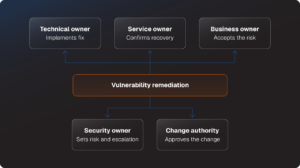
One generic “owner” field rarely clears up those questions. A practical remediation workflow should establish several roles:
- Technical owner: The person or team responsible for implementing the patch, configuration change, or other corrective action
- Service owner: The person or team accountable for the service affected by the work
- Business owner: The stakeholder who helps assess timing, impact, and risk acceptance
- Security owner: The person or function responsible for the finding, risk analysis, target date, and escalation path
- Change authority: The individual or group responsible for authorizing the remediation approach when a production change is involved
Clear roles don’t require a long approval chain for every patch. Unnecessary approvals can leave routine remediation work sitting in a queue. The goal is to match the level of governance to the risk and complexity of the work.
The SolarWinds ITSM Maturity Guide makes a related point: teams need asset discovery, software and configuration data, and asset-to-incident correlation to move from a basic inventory to data that supports security and compliance decisions. The guide also cautions teams against trusting discovery data without validation. A scanner may find a device, but it can’t reliably assign business ownership on its own.
Automation can expand asset coverage. Teams still need to validate ownership and keep records current.
Treat remediation like managed work
The strongest vulnerability-management programs treat remediation as repeatable work with clear stages, ownership, evidence, and escalation. The workflow should support urgent action when necessary, without turning every high-priority finding into an undocumented exception.
A basic remediation workflow might look like this:
|
Stage |
What happens |
Useful evidence |
|
Intake |
The finding is documented with vulnerability details, affected asset, source, severity, and target date |
Scan or advisory reference, asset ID, risk rating |
|
Triage |
Teams confirm the asset is active, in scope, exposed, and connected to an owner and service |
Asset status, technical owner, business criticality, service relationship |
|
Prioritization |
Teams weigh technical severity against exploitability, exposure, business impact, and compensating controls |
Prioritization rationale, target remediation date, escalation level |
|
Assignment |
The right team receives actionable work with a defined responsibility |
Assigned team, task owner, security owner, service owner |
|
Planning |
Teams select an implementation approach and document testing, timing, dependencies, and rollback |
Change type, test plan, implementation plan, rollback plan |
|
Remediation |
Teams apply the patch, configuration adjustment, access change, upgrade, or compensating control |
Completion notes, task record, change record |
|
Validation |
Teams confirm the vulnerability is addressed and the service continues to function |
Rescan result, version check, application test, monitoring confirmation |
|
Closure or exception |
Teams close the record with evidence or document a time-bound risk exception |
Closure evidence, exception approval, compensating controls, review date |
|
Improvement |
Teams investigate repeated findings and failed remediation patterns |
Problem record, knowledge article, lifecycle or process improvement |
IT service management provides the operating disciplines behind this type of workflow. Incident management, problem management, change management, service requests, asset management, and configuration management each solve a different piece of the execution problem.
A central system of record also gives teams a better alternative to email threads, chat messages, personal spreadsheets, and shared inboxes. Those tools can help people communicate, but they don’t reliably preserve ownership, due dates, implementation evidence, escalation history, or exception approvals.
The right service desk can simplify vulnerability remediation
For organizations just getting started, SolarWinds Web Help Desk, our on-premises solution, can centralize tickets, associate support issues with IT assets, retain service history, automate routine tasks, and support SLA reporting. That creates a more accountable baseline for teams that are moving away from inbox-based remediation tracking.
Teams with more complex requirements may need broader ITSM capabilities. SolarWinds Service Desk can add IT asset management, CMDB relationship context, automation, knowledge management, and connected incident, problem, and change workflows. IT Asset Management is an additional purchase, and available discovery, risk-management, and dependency-mapping capabilities vary by plan.
Learn more about both options and determine which fits your environment and needs.
Prioritize risk, not ticket age
A critical vulnerability won’t demand the same action on every asset. Severity matters, but remediation decisions need a fuller view of risk. Current CISA guidance reinforces this risk-based approach. CISA’s Known Exploited Vulnerabilities (KEV) Catalog should be an input to vulnerability-management prioritization. CISA’s latest federal directive also emphasizes factors such as public exposure, evidence of exploitation, and technical impact rather than relying on severity alone. The directive applies to federal civilian agencies, so other organizations should adapt the principles to their own risk and remediation policies.
Teams may need to consider:
- Exploitability and evidence of active exploitation
- External exposure or potential access path
- Asset criticality and data sensitivity
- The business service or process affected
- Availability and safety requirements
- Existing compensating controls
- Patch availability and implementation complexity
- Potential service disruption during remediation
- Whether the asset is already scheduled for retirement or replacement
- The age of the finding and whether its target date has passed
This doesn’t give teams permission to defer remediation because the work is difficult. It gives them a framework to distinguish a documented, risk-based decision from a ticket that has aged because nobody knows who owns the asset.
Discover and flag unknown IT assets
SolarWinds Service Desk includes a Risks module that can monitor asset inventory against defined thresholds and flag conditions such as unauthorized software, devices without active antivirus coverage, and software installations outside compliance policies. It can also connect risk context to broader ITSM workflows, including problem management (Availability depends on plan and add-on configuration).
A mature program also measures more than average time to patch. Consider tracking:
- The percentage of critical assets with a current technical owner and service owner
- The percentage of critical findings linked to an identified asset and affected service
- Median and 90th-percentile time to remediate critical vulnerabilities
- The percentage of findings remediated within policy targets
- The number and age of open risk-acceptance exceptions
- The percentage of remediation changes with documented validation
- The failed-change rate for security-related changes
- The number of repeat findings on the same asset or service
- The percentage of remediation tasks closed without verification evidence
The 90th percentile deserves attention because averages can hide a long tail of neglected vulnerabilities. A team may report a healthy average remediation time while a smaller set of business-critical findings remains open well beyond its target date.
Fast remediation still needs change control
Security teams need to move quickly, particularly when a vulnerability is actively exploited or easily reachable from the internet. But “patch immediately” doesn’t give an operations team enough direction for a production environment.
A patch may require downtime. A configuration change may affect a shared dependency. A version update may break an integration. A rushed fix can cause an outage that creates another operational and business problem.
IT change management gives teams a structured way to assess, approve, plan, test, implement, review, and document changes. The purpose is to help teams understand risk, expected impact, rollback options, and post-implementation validation before a change reaches production.
For vulnerability remediation, teams can separate work into three broad categories:
|
Change type |
Best fit |
Example |
|
Standard change |
Repetitive, low-risk work with a documented procedure and preauthorization |
Applying a routine patch to a defined group of managed endpoints |
|
Normal change |
Work that needs impact analysis, scheduling, testing, and approval |
Updating a production application component with known service dependencies |
|
Emergency change |
Urgent action needed to address active exploitation or immediate severe risk |
Disabling an exposed service or implementing an urgent mitigation for an actively exploited vulnerability |
Emergency changes still need records. The change record should capture why the work was urgent, what changed, who approved it, which systems were affected, how the team validated the result, and which follow-up tasks remain.
The Ultimate Guide to ITSM Maturity recommends formal approvals, defined change workflows, task and notification processes, change scheduling, and records that connect changes back to related assets and incidents. It also warns that a full Change Advisory Board review for every routine patch can slow work unnecessarily.
Standardization helps teams move faster when the work is predictable. More complex or higher-impact changes need a closer review of service dependencies, testing, rollback, and timing.
Close the loop with validation
Closing a ticket doesn’t necessarily mean a vulnerability has been resolved.
Teams need evidence that the corrective action was completed and that the affected service still works as expected. Depending on the remediation, validation may include:
- A follow-up vulnerability scan
- A software version or configuration check
- Application testing
- Endpoint or infrastructure monitoring confirmation
- A review of access controls or policy settings
- Confirmation from the technical or service owner
If remediation can’t happen right away, the exception should be visible and time bound. It should include:
- The specific risk being accepted
- The affected assets and services
- Any compensating controls
- The person or group responsible for the decision
- The approval authority
- A target expiration or review date
- Conditions that would trigger earlier remediation
Exceptions without expiration dates can quietly become permanent exposure
Repeated vulnerabilities deserve more than repeated tickets, too. If the same weakness appears across multiple systems, returns after remediation, or persists because the application is unsupported, the issue may need problem management.
Problem management focuses on the root causes behind recurring incidents. It can help teams investigate patterns, document workarounds, implement durable fixes through change management, and capture lessons learned.
In a security context, a durable fix could involve replacing an unsupported system, improving a configuration baseline, changing a deployment process, revising an asset-lifecycle policy, or eliminating a manual process that leaves systems unpatched.
Reducing today’s exposure matters. Improving the operational conditions that create repeat exposure matters just as much.
Build the operating foundation
Security tools are essential. So are the service management practices that determine whether a finding turns into completed, verified remediation.
Start with a few direct questions:
- Can we identify the affected asset, technical owner, service owner, and business criticality when a high-severity finding appears?
- Can we see dependencies that affect remediation timing, testing, or rollback?
- Does every remediation task have an accountable owner, target date, and implementation path?
- Do routine patches follow a repeatable standard change process?
- Can we confirm the fix worked and the service remained healthy?
- Are risk exceptions visible, approved, time-bound, and reviewed?
- Do recurring findings trigger root-cause work instead of another cycle of ticket closure?
If several answers are no, the next improvement may not be another dashboard. The team may need better asset data, clearer ownership, stronger incident-management processes, or change workflows that balance speed with accountability.
In the next post, we’ll examine the CMDB question: what makes configuration data useful for cybersecurity decisions, and why collecting more fields won’t necessarily make teams more prepared.