
An ITSM license quote is easy to compare. The actual cost of operating the platform is not.
A service desk may look affordable on paper, then become expensive in ways that do not appear in the initial subscription conversation. Implementation services, internal labor, platform administration, workflow changes, training, integrations, and low adoption all affect what an organization ultimately spends to get value from its ITSM investment.
That is why ITSM total cost of ownership, or TCO, matters more than license price alone.
The right question is not simply, “What does this platform cost?” But “What will it take to implement, operate, improve, and get meaningful results from this platform over time?”
License price is only one line item
A complete ITSM pricing comparison should start with subscription costs, but it should not stop there. The total cost of ownership includes the work required to make the system useful in daily operations.
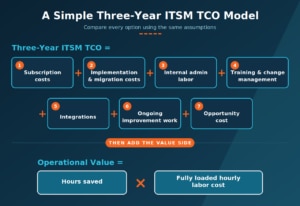
For a mid-market IT team, that often means looking at the following costs:
|
Cost area |
What to evaluate |
|
Subscription |
How is the product priced? Are you paying for technicians, requesters, assets, add-ons, or some combination? |
|
Implementation |
How much configuration, data cleanup, integration work, testing, and change management are needed before launch? |
|
Administration |
Can the team manage forms, workflows, automation, access, reporting, and service catalog updates with its existing resources? |
|
Training and adoption |
How much time will technicians and employees need to learn the system and change established habits? |
|
Ongoing improvement |
How much effort will it take to maintain knowledge, refine workflows, expand automation, and keep asset data current? |
|
Opportunity cost |
What other IT work gets delayed while the organization implements and manages the platform? |
The goal is not to find the lowest-cost platform in isolation. It is to understand which option gives your team the strongest operational return for the effort and budget required.
The cost of manual work adds up
Many ITSM costs appear as labor rather than invoices.
A technician manually routing tickets, answering repeat questions, chasing approvals, correcting incomplete requests, or searching for asset information may not create a separate budget line. But those activities take time away from incident resolution, project work, security initiatives, service improvement, and the work the business expects IT to move forward.
That is where ITSM capabilities such as automation, knowledge management, self-service, and asset management become part of the TCO conversation. They are not just feature checklist items. Used well, they can reduce operational friction.
SolarWinds 2024 State of ITSM Report found that organizations using automation, self-service portals, knowledge management, and asset management together had average incident resolution times of 19 hours, compared with 29 hours for organizations using none of these capabilities. The report also found that organizations using self-service portals reduced average incident resolution time by just over two hours per ticket. These were observational comparisons, and the report notes that the sample of organizations using none of these capabilities was relatively small.
That does not mean every organization will see the same result. Workflows, ticket complexity, adoption, process maturity, and knowledge quality all matter. It does show why a service desk business case should include the time IT can recover—not only the amount spent on licenses.
Think beyond the service desk queue
ITSM total cost of ownership is also shaped by how well the platform helps teams manage the work around the ticket.
Consider a common example: a new employee needs a laptop, application access, and account provisioning.
Without clear workflows, the request may arrive through email or chat, move between managers and IT teams manually, and require repeated follow-up. With a well-designed service catalog, defined approvals, automated routing, and relevant integrations, that same request can be tracked and fulfilled through a repeatable process.
The point is not that every workflow should be automated. Trying to automate a weak process only creates faster confusion. SolarWinds ITSM maturity guidance makes that point plainly: teams should optimize the underlying process before turning it into automation. SolarWinds Service Desk automation rules can route, assign, prioritize, and categorize tickets based on defined conditions such as category, priority, keywords, requester, or custom fields. They can also update records, send notifications, and trigger process integrations.
But when common requests follow reliable patterns, automation can reduce handoffs, errors, and wait time. SolarWinds ITSM guidance notes that automated workflows can route tickets based on category, urgency, or technician availability; trigger approvals and escalations; update statuses; and notify users. These workflow capabilities reduce manual effort and help keep service work moving.
Administrative effort belongs in the TCO model
Every service desk needs an owner, but how much specialized effort does that ownership require? Someone must maintain categories, forms, workflows, service catalog items, reports, permissions, knowledge articles, and integrations.
Before buying an ITSM platform, teams should ask whether people who understand the service process can handle routine changes or whether they need developers, consultants, or a dedicated platform administrator. The answer directly affects the tool’s operating cost.
SolarWinds ITSM maturity guidance suggests teams should optimize the underlying process before turning it into automation. For example, it advises teams not to create hundreds of incident subcategories in the name of standardization, because complexity can hurt adoption. It similarly recommends tracking asset data that supports decisions rather than collecting information simply because the system can store it.
That is a useful TCO principle: the cost of a platform is not only what it can do. It is also what it takes to keep it usable.
Asset visibility can reveal waste
IT asset management is another area where ITSM can affect total cost.
When teams do not have a reliable view of hardware, software, contracts, and software usage, they may renew licenses that are no longer needed, overlook aging assets that generate recurring incidents, or make purchasing decisions without clear usage data.
SolarWinds ITSM maturity guidance recommends monitoring license utilization to identify waste and reduce risk. At more advanced levels, it suggests using actual usage data to identify unused licenses or support contract renewal negotiations.
That makes asset management more than an inventory exercise. It gives IT data that can inform spending decisions.
A mature ITSM program can also connect asset cost to operational impact. For example, teams can compare an asset’s purchase cost with the incident volume associated with that asset to identify high-cost, low-reliability devices that may need replacement.
Calculate value with a realistic model
A practical TCO model does not need to predict every possible expense perfectly. It should help stakeholders compare options using the same assumptions.
SolarWinds 2025 State of ITSM Report provides one way to model this. In its analysis of a normalized customer sample covering more than 2,000 ITSM systems and more than 60,000 aggregated, anonymized data points, the 2025 State of ITSM Report found that average incident resolution time among organizations that enabled GenAI features in SolarWinds Service Desk fell from 27.42 hours before enablement to 22.55 hours afterward. That is an average reduction of 4.87 hours per incident, or a 17.8% relative reduction.
The report offers an illustrative example for a team handling 5,000 incidents annually:
4.87 hours per incident×5,000 incidents=24,350 hours reclaimed annually
Using a hypothetical fully loaded help desk at an hourly cost of $28, SolarWinds estimates that those recovered hours could represent more than $680,000 in efficiency value. This is a modeled example, not a savings guarantee. Results vary based on processes, ticket volume, adoption, and the organization’s own labor costs.
The broader takeaway is straightforward: a useful ITSM business case should put value on time, not just technology.
Questions to ask in an ITSM pricing comparison
When evaluating ITSM platforms, procurement and IT leaders should move beyond the first quote and ask questions that reveal ongoing costs:
- What is included in the base subscription, and which capabilities require additional products or services?
- How are technicians, requesters, assets, and integrations priced?
- What must be configured before the initial deployment?
- Which workflows, reports, and service catalog changes can the internal IT team manage?
- How much specialized expertise will the team need after go-live?
- What data must be cleaned or migrated before launch?
- How will the platform help reduce repetitive work and improve resolution efficiency?
- Which operational metrics should we use to evaluate value after deployment?
- What can we reasonably accomplish in the first 90 days?
The answers will usually tell you more about the real cost of ownership than a price-per-user figure ever can.
Buy for value you can sustain
The best ITSM platform is not necessarily the one with the longest feature list or the lowest initial price. It is the one that fits the organization’s needs, helps the team improve service delivery, and can be operated without creating disproportionate overhead.
SolarWinds Service Desk is designed to help teams centralize service management, support self-service, automate routine work, manage assets, and use service data to improve operations over time. The 2026 State of ITSM Report reinforces the broader point: AI value depends on how it is applied, maintained, measured, and supported by the workflows and data around it.
When assessing an ITSM purchase, compare the entire operating picture. The subscription is the starting point. Total cost of ownership is the decision.
Explore SolarWinds Service Desk and see how a more efficient service desk can support your ITSM goals.