

Your ITSM project is months in, but employees still send requests by email, approvals still sit in inboxes, and technicians still spend time figuring out who owns what. The organization is paying for a new platform while still operating with the same friction it was meant to solve.
The goal of a successful ITSM implementation is not to configure everything before launch. It is to put a useful foundation in place quickly, help people adopt it, and use real operational data to decide what comes next.
This matters especially for mid-market IT teams, where the people implementing the service desk are often the same people responsible for keeping daily support running.
A quicker start does not mean skipping planning, governance, testing, or training. It means setting a practical first scope, launching the workflows that matter most, and improving from there.
Long implementations delay the value you bought
Most organizations invest in ITSM because they need better service delivery.
They want to move away from scattered email requests. They need better ticket visibility, clearer ownership, more consistent service levels, easier access to knowledge, and fewer repetitive tasks falling on technicians.
Those benefits do not begin with contract signature. They begin when people use the platform in their daily work.
While an implementation drags on, IT may still handle requests through informal channels, manage approvals manually, and spend time on recurring questions that a self-service portal or knowledge base could address. The organization continues to carry the cost of existing inefficiencies while also investing time in the new project.
For lean IT teams, that can be the hardest part. The same people who need to implement the new service desk often keep the current support operation running. Consider employee onboarding. A single request may involve a laptop, application access, account setup, and approvals from HR or a manager. When those steps are split across email and spreadsheets, work gets delayed and ownership becomes unclear. A service desk can bring those steps into one trackable workflow, even if the team starts with only its highest-volume requests.
Start with the work that matters most
A service desk doesn’t have to be fully mature on day one to be useful.
SolarWinds Ultimate Guide to ITSM Maturity recommends a “one thing” mindset: do not try to improve every area of service management at the same time. Instead, choose one pillar and focus on implementing one specific capability during the quarter. Small, consistent improvements build momentum for longer-term transformation.
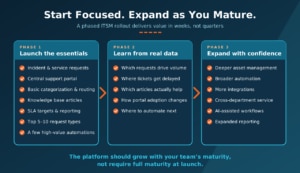
The same principle applies to implementation. Rather than launching with every possible workflow, integration, category, dashboard, and service catalog item, teams can start with the activities that create the most immediate value:
- Incident management and service requests
- A central support portal
- Basic ticket categorization and routing
- A knowledge base for common issues
- Service-level targets and reporting
- The most frequent employee requests
- A small number of high-value automations
Our maturity guide specifically recommends starting a service catalog with the five to 10 most frequent request types, such as onboarding or password resets, instead of trying to turn every small task into a catalog item immediately. That lets teams demonstrate value quickly while establishing a base they can expand over time.
Complexity is the enemy of adoption
ITSM implementations can slow down when teams treat the initial rollout as a chance to redesign every process, collect every possible data point, and account for every exception before launch.
Some planning is necessary. Overengineering isn’t.
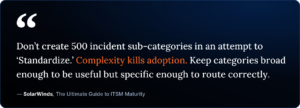
SolarWinds maturity guidance warns against creating hundreds of incident subcategories in the name of standardization, noting that complexity can hurt adoption. It also cautions teams against tracking asset data that will not support real decisions.
These lessons also apply to the deployment plan.
A well-designed initial implementation should be structured enough to create consistency but simple enough for people to understand and use. If employees cannot find the right request form, technicians cannot navigate queues, or the service catalog is overloaded with options. Adoption will suffer, no matter how sophisticated the underlying platform may be.
Start with a structure that reflects the way people ask for help. Then refine it as you gather real usage data.
What a first-phase rollout should deliver
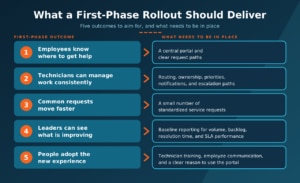
Fast deployment is not a shortcut around good service management. The goal is to establish a useful first phase that improves the employee and technician experience, creates visibility into service performance, and gives the team a foundation to build on. A first-phase rollout should help deliver these outcomes:
|
First-phase outcome |
What needs to be in place |
|
Employees know where to get help |
A central portal and clear request paths |
|
Technicians can manage work consistently |
Routing, ownership, priorities, notifications, and escalation paths |
|
Common requests move faster |
A small number of standardized service requests |
|
Leaders can see what is improving |
Baseline reporting for volume, backlog, resolution time, and SLA performance |
|
People adopt the new experience |
Technician training, employee communication, and a clear reason to use the portal |
This gives IT a way to move out of reactive, informal work without creating a massive initial project.
The next phases can add deeper asset management, broader automation, more integration, cross-department service delivery, AI-assisted service workflows, and expanded reporting. The platform should grow with the team’s maturity rather than require full maturity at launch. This is where a practical, configurable service desk matters.
SolarWinds Service Desk can support this phased approach, allowing teams to start with core service management workflows and expand into automation, asset management, reporting, and AI-assisted capabilities as their needs mature. Specific capabilities vary by plan, so teams should align their rollout goals with the functionality included in their selected tier.
Build the portal people will use
One of the first visible signs of a functioning ITSM program is a support experience employees can navigate.
A self-service portal lets users submit requests, track progress, find knowledge articles, and access services without relying entirely on direct contact with IT. For the service desk, it can reduce back-and-forth communication and make demand easier to see and manage.
SolarWinds found that self-service portals were associated with average incident resolution times just over two hours shorter per ticket. The research also found that users can submit more detailed tickets and access knowledge articles, which can reduce follow-up and potential delays. Because this was an observational comparison, results will vary based on portal adoption, knowledge quality, workflow design, and ticket complexity.
But launching a portal is not enough by itself. The content must be useful, the design intuitive, and employees must know it exists.
Simply building a portal does not guarantee employees will use it. Teams need to promote the portal and make it the natural starting point for support.
Automate the right work first
Automation is one of the fastest ways to improve service delivery after the initial setup is in place.
Automated workflows can assign tickets based on category, urgency, or technician availability. They can route approval requests to the right people, update ticket statuses, notify users, and keep tasks from slipping through the cracks.
The early goal should not be to automate everything. Instead, identify the repetitive work that causes the most delay or requires the most manual coordination.
For example, an employee onboarding request may require IT to provision accounts, prepare equipment, assign applications, and coordinate with HR or a hiring manager. A structured workflow can ensure the right work happens in the right order, with fewer email threads and fewer missed steps.
The same principle applies to common requests, password issues, access changes, standard software provisioning, and recurring incident types. As workflows become stable, teams can add more advanced automations and integrations. SolarWinds maturity guide recommends using workflows and runbooks to automate approvals, trigger actions in third-party systems, and reduce bottlenecks in service fulfillment.
Go live sooner, learn sooner
The benefit of a focused ITSM rollout isn’t just that teams go live sooner. They also learn sooner.
Once technicians, employees, and managers are working in the platform, the IT team can see:
- Which request types create the most volume
- Where tickets get delayed
- Which knowledge articles are useful
- Which workflows require too many approvals
- Where automation can reduce repetitive work
- How portal adoption changes over time
- Which services need more precise service-level targets
That data is difficult to act on when service management remains in email inboxes, spreadsheets, and informal conversations.
It also helps IT identify which improvements will produce the next gain. Rather than investing months in assumptions, the team can prioritize based on operational evidence.
AI and automation can become part of later phases, once core workflows and service data are in place. The best candidates are the repetitive tasks and bottlenecks the team identifies after launch.
Faster doesn’t mean careless
An ITSM rollout still requires thoughtful planning.
Teams need to define ownership, clarify core processes, prepare data, establish basic governance, test workflows, train technicians, and communicate changes to employees. SolarWinds ITSM implementation guidance also recommends structured change management, risk assessment, stakeholder communication, testing and validation, and a post-implementation review.
The difference is scope. A phased rollout does not wait to solve every process maturity challenge before giving the team a usable service desk. It identifies the core workflows that need to work now, creates a reliable starting point, and builds toward broader maturity in phases.
That often fits mid-market IT teams better, where staff needs to keep the business running while improving service delivery.
Ask vendors about the first 90 days
When evaluating ITSM platforms, do not settle for a vague deployment estimate. Ask vendors to describe what the first 30, 60, and 90 days should look like for an organization of your size and maturity.
Useful questions include:
- What core workflows can we realistically have in production in the first month?
- What tasks require internal IT time during implementation?
- What should we include in the first release, and what should wait for later phases?
- Which changes can our administrators make without specialized technical resources?
- What support is available for data migration, onboarding, and workflow design?
- How can we measure portal adoption, ticket routing accuracy, backlog reduction, and SLA performance after launch?
- How should we prioritize automation after the initial go-live?
These questions shift the conversation from an abstract implementation timeline to a plan for delivering useful service improvements.
A service desk should start helping quickly
The case for a first-phase ITSM rollout is not about rushing. It is about recognizing that IT teams need usable improvements now.
A practical deployment gives technicians a central place to manage work. It gives employees a better way to get help. It gives leaders service data they can use to make decisions. And it gives the organization a foundation for automation, asset management, self-service, and AI-assisted workflows when it is ready.
Your ITSM platform should not become the project that prevents IT from improving service. It should give your team a workable foundation early, with room to keep improving after launch.
The SolarWinds ITSM Maturity Model reinforces the value of this staged approach: focus on a clear next improvement, prove it in practice, and build it from there. SolarWinds Service Desk is built to support that kind of ongoing maturity. Teams can begin with core service management workflows, then add automation, knowledge, self-service, asset management, reporting, and AI capabilities as their operational needs evolve.
Explore SolarWinds Service Desk to see how your team can put this approach into practice.