
A configuration management database can support better cybersecurity decisions. It can also become a stale collection of technical details nobody trusts when an incident, vulnerability, or production change puts the environment under pressure.
The difference comes down to whether the CMDB helps people answer practical questions quickly.
When a critical vulnerability appears, teams need more than an asset name and IP address. They need to know who owns the affected system, what service it supports, which other systems depend on it, what has changed recently, and how a remediation plan could affect users. A security-useful CMDB helps connect those facts to the work already happening in service management.
This post continues our Cyber Resilience in Service Management series, which looks at how ITSM, IT asset management, service desks, and related operational practices support cybersecurity work. In the first post, we covered the gap between vulnerability discovery and verified remediation. Here, we’ll focus on the context teams need to make sound decisions.
A CMDB should support decisions
A configuration management database (CMDB) stores information about configuration items, often called CIs, and the relationships between them. Those CIs may include servers, applications, databases, network devices, cloud resources, business services, or other components that support IT services.
That definition matters, but it doesn’t tell the whole story.
Teams often treat a CMDB project as a data-collection exercise. They create fields, import records, run discovery scans, map relationships, and try to improve completeness. Those activities matter. A CMDB still needs reliable data. But a large collection of records won’t help much if responders can’t use it to answer questions during a vulnerability investigation or a high-impact incident.
A useful CMDB should help teams answer:
- What is this configuration item?
- Is it active, retired, duplicated, or unknown?
- Who owns the technology and the service it supports?
- Which application, business service, or process depends on it?
- What systems depend on it, and what does it depend on?
- Is it exposed externally, internally, or through a third-party connection?
- What incidents, problems, changes, risks, or service requests are connected to it?
- What changed recently?
- What could break if the team patches, restarts, reconfigures, or isolates it?
These are operational CMDB questions that surface when teams need to reduce risk without taking down a business-critical service.
NIST’s Cybersecurity Framework calls for organizations to identify and manage data, personnel, devices, systems, and facilities based on their relative importance to business objectives and risk strategy. NIST CSF 2.0 also includes maintained inventories for hardware, software, services, systems, data, supplier services, and lifecycle management—not only physical devices.
A cybersecurity-ready CMDB supports that broader view. It should connect technical components to services, owners, dependencies, and work records.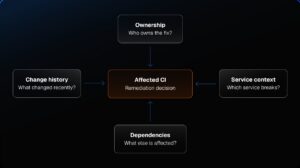
ITAM and CMDB work together
IT asset management and configuration management overlap, but they solve different problems.
IT asset management helps teams track and manage technology assets throughout their lifecycle. That can include laptops, servers, network equipment, software, licenses, cloud resources, and other IT components. IT asset management (ITAM) often focuses on procurement, deployment, assignment, utilization, maintenance, compliance, cost, and retirement.
A Configuration Management Database (CMDB) adds configuration and relationship context. It helps teams understand how components work together to deliver a service.
Consider an application that handles customer transactions. ITAM might track the servers, operating systems, software licenses, and related contracts. A CMDB can extend that view by connecting:
- The application to its web, application, and database servers
- The application to identity, DNS, storage, logging, and network services
- The technical components to the customer-facing business service
- The service to technical and business owners
- The components to recent incidents, problems, and changes
- The service to known dependencies and downstream effects
The difference between the two is important when a vulnerability scanner flags a middleware component. An asset inventory can help identify the affected system and its owner. A CMDB can help teams understand whether that component supports a low-risk internal tool, a business-critical customer service, a shared platform, or several applications at once.
The goal isn’t to document every possible attribute. Teams should collect and maintain the information they will use to make decisions. SolarWinds Service Desk connects IT asset management and CMDB capabilities with incident, problem, and change management workflows. Teams can link configuration items to related service records, incidents, changes, and problems to build more context around the work.
Build a security-useful data model
Security teams don’t need a separate CMDB for cybersecurity. They need a shared, trustworthy source of operational context that includes the data required to scope, prioritize, coordinate, and validate security-related work.
A practical data model starts with a small set of fields and relationships that answer real questions.
|
Information category |
Useful CMDB data |
Security and operations value |
|
Identity |
CI name, type, unique identifier, hostname, IP address, cloud resource ID |
Confirms what teams are investigating and helps reconcile information across tools |
|
Lifecycle |
Active, inactive, planned, retired, duplicate, unknown |
Helps teams avoid spending time on stale or decommissioned systems |
|
Ownership |
Technical owner, service owner, business owner, support group |
Establishes who can remediate, test, approve downtime, and accept residual risk |
|
Service context |
Application, business service, business unit, customer-facing status |
Helps teams evaluate operational and business impact |
|
Criticality |
Service tier, business criticality, data sensitivity, recovery priority |
Supports risk-based prioritization beyond a vulnerability severity score |
|
Technical context |
Operating system, software version, cloud environment, location, environment |
Helps determine whether a finding applies and which remediation path is appropriate |
|
Dependencies |
Upstream services, downstream services, shared infrastructure, APIs, identity services |
Supports impact analysis, maintenance planning, and recovery sequencing |
|
Change history |
Recent changes, planned changes, maintenance windows, failed changes |
Helps investigators assess whether a change created or worsened an issue |
|
Operational history |
Related incidents, known problems, workarounds, support history |
Identifies recurring issues and helps avoid repeating past mistakes |
|
Security context |
Vulnerability findings, risk status, compensating controls, exception expiration |
Supports prioritization, accountability, and evidence of risk treatment |
Match CI data to the decisions teams need to make
Not every CI needs every field. A network switch, SaaS service, laptop, containerized workload, database, and customer-facing application won’t share the same data needs.
The better question is: What information do teams need to make a safe decision about this class of configuration item?
A production application may need service criticality, business ownership, maintenance windows, dependencies, recovery priorities, and connected change history. A managed laptop may need assigned user, endpoint status, operating system, installed software, and support history. A third-party SaaS platform may need a service owner, vendor contact, data classification, integration points, contract information, and business continuity considerations.
The SolarWinds ITSM Maturity Guide recommends moving from basic asset inventory to deeper discovery, software tracking, asset-to-incident correlation, CMDB use, dependency mapping, and lifecycle intelligence. It also advises teams to avoid tracking data they won’t use. Excess fields can make records harder to maintain without improving decisions.
Relationships make the CMDB valuable
A CMDB’s value comes from relationships, not just records. A list of servers can identify where a vulnerable component may be installed. A relationship map can help teams understand what may happen if one of those servers is patched, restarted, isolated, or taken offline.
For cybersecurity and service management teams, several relationship types are especially useful:
|
Relationship |
Example |
Why it matters |
|
Supports |
Application server supports a customer portal |
Connects technical changes to a business service |
|
Depends on |
Customer portal depends on identity, database, DNS, and payment services |
Helps teams assess potential impact and recovery order |
|
Runs on |
Application runs on a virtual machine or cloud instance |
Helps locate the infrastructure and remediation owner |
|
Hosted by |
Virtual machine is hosted by a physical server or cloud platform |
Adds infrastructure context during availability and patching work |
|
Uses |
Application uses a shared API or third-party SaaS platform |
Reveals external and shared-service dependencies |
|
Managed by |
Server is managed by an infrastructure support group |
Helps route remediation work |
|
Owned by |
Service is owned by a business unit or application team |
Connects technical activity to business accountability |
|
Changed by |
CI was modified through a recent approved change |
Helps investigators correlate degradation or exposure with recent work |
|
Affected by |
CI is linked to an incident, problem, or security finding |
Creates an operational history around the component |
Prioritize the relationships that guide remediation decisions
The CMDB doesn’t need to model every cable, setting, and relationship before it becomes useful. Start with the relationships that affect the decisions teams make most often.
For example, a vulnerability remediation workflow usually benefits from knowing:
- Which service the affected CI supports.
- Who owns the service and who owns the technical component.
- Whether the CI is production, development, test, or retired.
- Which upstream or downstream dependencies may need testing.
- Whether other planned changes could collide with the remediation work.
- Whether previous incidents, problems, or change failures point to known risks.
SolarWinds Service Desk’s CMDB helps teams map relationships among configuration items and connect those CIs to incidents, problem, and change records. That gives IT operations and service management teams a better way to assess potential impact and investigate issues with context.
Keep the CMDB tied to operational work
A CMDB becomes stale when it lives outside daily workflows.
If teams only update configuration records during a quarterly audit, the data can fall behind as environments change. Cloud resources are created and removed. Applications move. Teams add integrations. Vendors change. Emergency fixes happen. Systems get retired without a clean handoff. A once-accurate dependency map can quickly become unreliable.
The answer isn’t asking one person to manually maintain every field in every record. Teams need processes that update or validate CMDB data as part of normal work.
Useful touchpoints include:
- Asset discovery: Use discovery data to identify devices, installed software, and network-connected assets. Review exceptions and assign ownership rather than assuming auto-discovered data is complete.
- Incident management: Link incidents to affected assets and CIs. Over time, those links show which components generate repeated issues and where technical debt may be accumulating.
- Change management: Require teams to associate material changes with affected CIs. Changes can validate relationships, document architecture updates, and provide useful history during later investigations.
- Problem management: Use recurring incidents and known errors to identify configurations, dependencies, or lifecycle issues that need a more durable fix.
- Service request workflows: Connect onboarding, provisioning, software requests, access requests, and procurement records to the assets and services involved.
- Lifecycle activities: Update records when assets are deployed, reassigned, upgraded, retired, or replaced.
- Periodic review: Validate high-value CIs and critical-service relationships on a schedule that reflects their rate of change and business impact.
Incident management gives teams a structured way to capture service disruptions and link them to the affected technology. Change management can connect approved work to the systems and services likely to be affected. Problem management can help teams investigate recurring failures that point to a deeper configuration, lifecycle, or dependency issue.
The SolarWinds ITSM Maturity Guide recommends using asset and incident correlation to identify assets that generate repeated issues. It also encourages teams to use CMDB data for change-impact analysis, then validate automated dependency maps against change records to reduce the risk of decisions based on outdated architecture.
That last point is worth emphasizing. A relationship map can be helpful without being perfect. Teams should treat it as operational evidence that needs validation, especially when a major change, security event, or recovery decision carries a large blast radius.
Don’t confuse CMDB completeness with CMDB trust
A complete CMDB is an appealing goal. It’s also easy to define poorly.
Teams sometimes measure success by the number of CIs, the number of fields filled in, or the number of relationship lines on a diagram. Those measures can show progress, but they don’t prove the data is useful.
A CMDB earns trust when the people responsible for incidents, changes, vulnerability remediation, and recovery can use it without regularly finding missing owners, stale services, inaccurate dependencies, or irrelevant detail.
Consider these practical tests:
|
Test |
Question to ask |
|
Ownership test |
Can teams identify the correct technical and service owners for a critical CI without a manual search? |
|
Impact test |
Can a change owner see which services or users may be affected before work begins? |
|
Investigation test |
Can an incident responder identify recent changes and related incidents for an affected CI? |
|
Remediation test |
Can a vulnerability team determine whether an asset is active, exposed, critical, and assigned to a responsible team? |
|
Recovery test |
Can teams identify which components and dependencies need to be restored first for a critical service? |
|
Change-validation test |
Do change records confirm or correct the relationships shown in the CMDB? |
|
Adoption test |
Do technical teams use the CMDB as part of daily service-management work, rather than treating it as an audit-only repository? |
Those tests shift attention from data volume to decision quality.
A team may have a modest CMDB that supports every critical service, has reliable owners, captures important dependencies, and connects to incident and change records. That CMDB may be more valuable than a much larger repository filled with disconnected records that nobody trusts.
Use the CMDB for vulnerability remediation
A vulnerability finding needs more context than a severity score.
A critical vulnerability on a development server may require prompt remediation, but the team may have a relatively low-risk maintenance path. The same vulnerability on an internet-facing production system supporting customer transactions may require urgent coordination across security, infrastructure, application, change, and business teams.
A security-useful CMDB can help teams ask the right questions before they act:
- Is the CI active and in scope?
- What environment is it in?
- What software or configuration applies to the finding?
- Who owns the CI technically?
- Which service does it support?
- Is the service customer-facing or business-critical?
- Does the CI contain, process, or connect to sensitive data?
- What components depend on it?
- What recent changes may affect the remediation plan?
- Is there a maintenance window or an existing change scheduled for the service?
- Has this CI experienced related incidents, failed patches, or known problems?
- Is there an approved exception or compensating control already in place?
Those answers can improve prioritization and reduce unnecessary back-and-forth. They can also help teams avoid the common failure mode of treating every finding as a stand-alone technical task.
A strong remediation process still needs security judgment. The CMDB won’t decide whether an exploit is credible, whether compensating control is sufficient, or whether emergency action is required. It can give decisionmakers a better view of the service, ownership, dependencies, and operational history surrounding the affected asset.
For teams that are formalizing this work, SolarWinds Service Desk CMDB capabilities can connect assets, configuration items, incidents, problems, and changes in one service-management environment. The purpose is practical: help teams investigate issues, assess change impact, and manage operational work with more context.
Measure usefulness, not database size
A cybersecurity-useful CMDB should have measurable outcomes. The right metrics will vary by environment, but the following indicators can show whether the data supports operations:
- Percentage of critical services with a documented service owner and technical owner.
- Percentage of high-value configuration items with an assigned lifecycle status.
- Percentage of material changes linked to affected CIs.
- Percentage of critical incidents linked to an affected CI and business service.
- Percentage of critical vulnerability findings matched to a current asset or CI record.
- Percentage of high-priority CIs with documented dependency relationships.
- Number of remediation delays caused by missing ownership or incomplete service context.
- Percentage of CMDB relationships validated or updated through change records.
- Number of recurring incidents associated with the same asset, CI, or service.
- Percentage of retired assets removed or marked inactive within a defined time frame.
These metrics can help teams find gaps without turning CMDB stewardship into a paperwork exercise.
For example, a low percentage of security findings matched to active asset records may point to discovery gaps, poor tool integration, inconsistent identifiers, or shadow IT. A high number of remediation delays caused by unclear ownership may show that the organization needs better service ownership practices, not more vulnerability scanners. A high percentage of changes without associated CIs may limit the team’s ability to investigate future incidents or validate dependency maps.
The goal is to make the CMDB a trusted part of operating the environment.
Start with the decisions that matter
A CMDB can grow into a large program. It doesn’t need to start that way.
- Pick a narrow scope where better configuration context would improve a real operational outcome. That could be:
-
- Customer-facing applications with frequent security patching.
- Systems supporting critical financial, healthcare, or operational processes.
- Services with repeated incidents or recurring vulnerability findings.
- Shared infrastructure with many downstream dependencies.
- High-risk cloud services or third-party integrations.
- Assets approaching end of life or running unsupported software.
2. Then identify the minimum CIs, relationships, ownership fields, and workflow connections that teams need to make safer decisions.
The SolarWinds ITSM Maturity Guide recommends focusing on practical improvements instead of trying to mature every discipline at once. It also advises teams to avoid data hoarding and focus on the information that supports decisions.
For many organizations, the first meaningful improvement is not a sprawling architecture map. It’s a reliable way to answer a few urgent questions:
- What is this system?
- Who owns it?
- What service does it support?
- What depends on it?
- What changed recently?
- And what happens if we take action?
Those answers can make the difference between a vulnerability ticket that drifts through multiple queues and a remediation effort that moves with the right context, people, and safeguards. To see this in action, start a free trial of SolarWinds Service Desk.
In our next post of the series, we’ll look at what happens when teams need to act fast: how to handle emergency patching and urgent remediation without creating operational chaos.