We are excited to announce our bidirectional integration between ServiceNow and SolarWinds Incident Response, designed to elevate your Incident Management capabilities. ServiceNow provides a robust platform-as-a-service, delivering advanced automation and process workflow tailored for enterprise environments. Through this integration, you can harness ServiceNow’s workflow and ticketing features alongside SolarWinds Incident Response’s strong On-Call scheduling and SRE-driven incident response capabilities. This integration facilitates seamless communication, synchronization of incidents, and an overall enhanced workflow between the two powerful platforms.
Let’s delve into the details of this exciting collaboration.
Challenges in Incident Management
- Communication Gaps: Siloed communication channels can hinder the timely resolution of incidents.
- Manual Data Entry: Manually updating incident information across platforms is time-consuming and error-prone.
- Inconsistent Workflows: Varied workflows across tools can lead to confusion and delays in incident resolution.
- Lack of Unified Experience: Users often grapple with different interfaces and functionalities between ServiceNow and SolarWinds Incident Response.
How the SolarWinds Incident Response ServiceNow Integration Addresses these Challenges
The SolarWinds Incident Response and ServiceNow collaboration is essential to ensure that incident-related information flows effortlessly, enabling teams to respond promptly and effectively. Here is how our ServiceNow Extension offers a comprehensive set of capabilities to optimize your Incident Management process:
- Bidirectional Incident Creation: The integration allows for the creation of incidents in both SolarWinds Incident Response and ServiceNow, whether initiated manually or automatically, ensuring that incident information is consistently updated across platforms.
- Efficient Incident Status Sync: Real-time synchronization of incident statuses between the two tools eliminates discrepancies and provides a unified view of incident progress.
- Seamless Information Sharing: Notes and attachments can be seamlessly shared between ServiceNow and SolarWinds Incident Response, promoting collaboration and facilitating a comprehensive incident resolution process.
- Unified Communication Channels: The integration enables the creation of incident-specific Slack channels from ServiceNow, ensuring that communication remains centralized and relevant.
- Automated Value Assignment: Leveraging SolarWinds Incident Response’s payload, the integration automates the assignment of values to incident fields, streamlining the process and aligning with SolarWinds Incident Response’s tagging rules.
- Trigger Manual Webhooks from ServiceNow: Easily trigger manual webhooks from ServiceNow to initiate specific actions in SolarWinds Incident Response, enhancing flexibility and enabling customized Incident Management workflows.
- Seamless synchronization of users, services, and more: Manage users by exporting ServiceNow users to SolarWinds Incident Response. Align services by syncing SolarWinds Incident Response Services with ServiceNow Configuration Items and exporting ServiceNow configuration items as services. Achieve synchronized Escalation Policies and Squads with ServiceNow Assignment Groups. Enhance collaboration and flexibility by exporting/pushing ServiceNow Groups to SolarWinds Incident Response as Squads.
Benefits of SolarWinds Incident Response ServiceNow Integration
How to Setup SolarWinds Incident Response-ServiceNow Integration
Prerequisites
Before you embark on this integration journey, ensure that you meet the following prerequisites:
- A ServiceNow subscription is a must-have.
- You should be subscribed to SolarWinds Incident Response’s Enterprise plan.
- All necessary permissions in SolarWinds Incident Response equivalent to the account owner are required to configure the extension integration effectively.
Step 1: Installing the SolarWinds Incident Response App in ServiceNow Marketplace
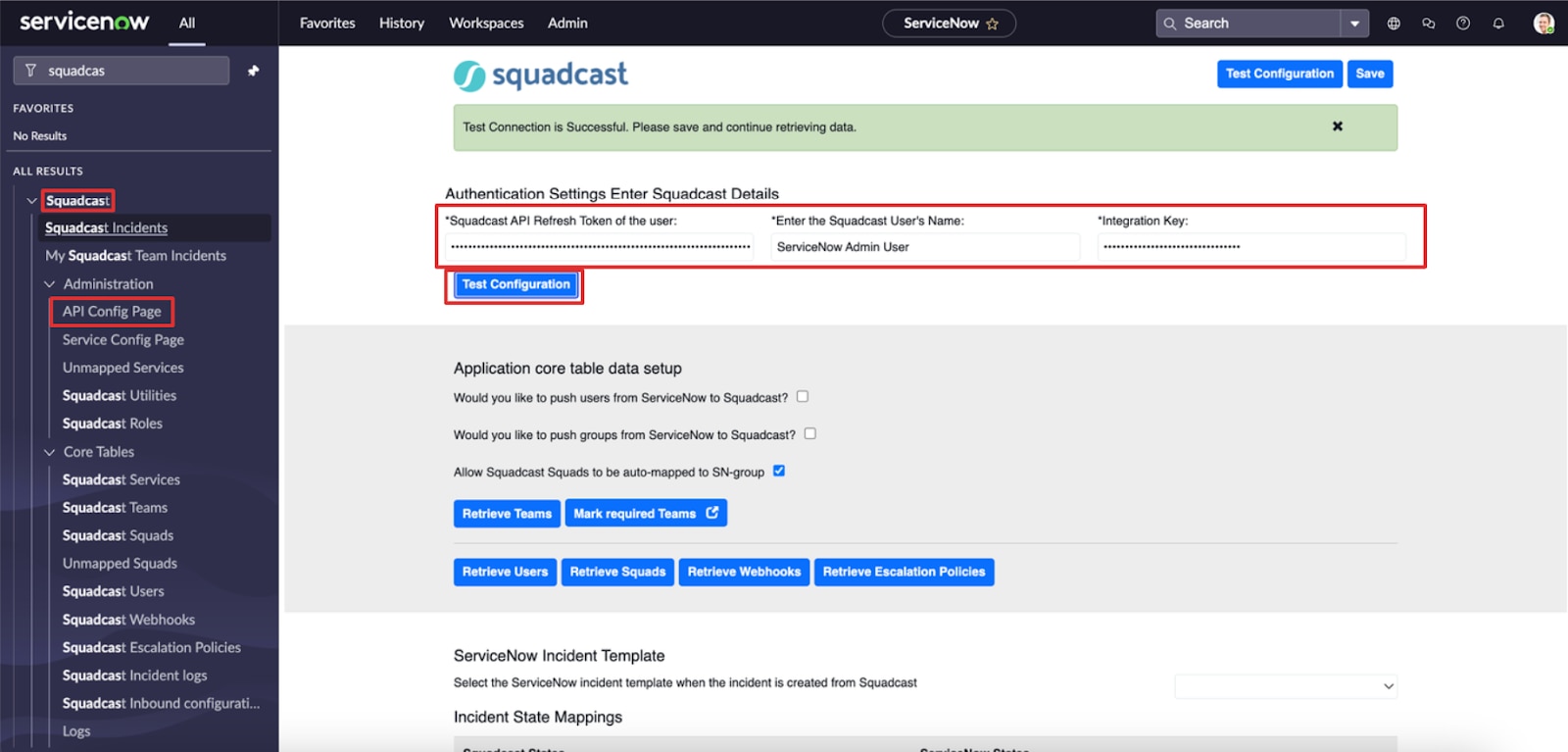
Initiate the integration process by installing the SolarWinds Incident Response application from the ServiceNow marketplace. Once installed, access the application and open the “API Config Page” to kickstart the configuration.
Step 2: Setting Up Integration User
Integration User in SolarWinds Incident Response
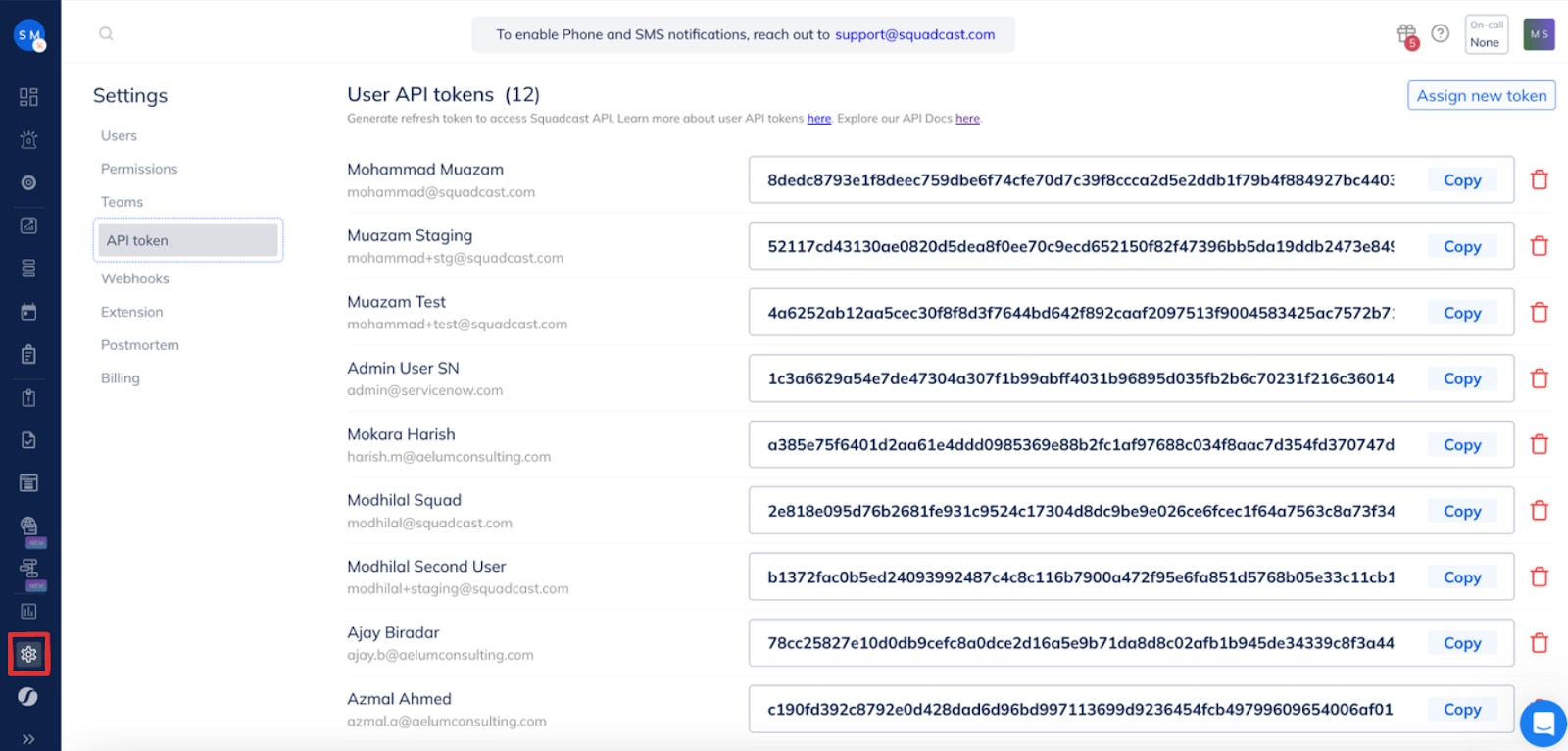
- Generate an API token for a user designated as the “Integration User” for this extension.
- Ensure this user possesses all SolarWinds Incident Response org-level permissions, along with “Manage Team” and “Admin” access to the relevant teams.
- It is recommended to create a dedicated user account in SolarWinds Incident Response for this purpose.
- Once created, generate an API token for this user by navigating to Settings > API Token > Create New Token > Select the integration user > Generate Token.
- Copy the generated “API token” and store it securely.
Integration User in ServiceNow
- Create a user account in ServiceNow dedicated to accessing this extension integration.
- Note down the “username” and “password” of this user for validation and connection.
Step 3: Setting up SolarWinds Incident Response
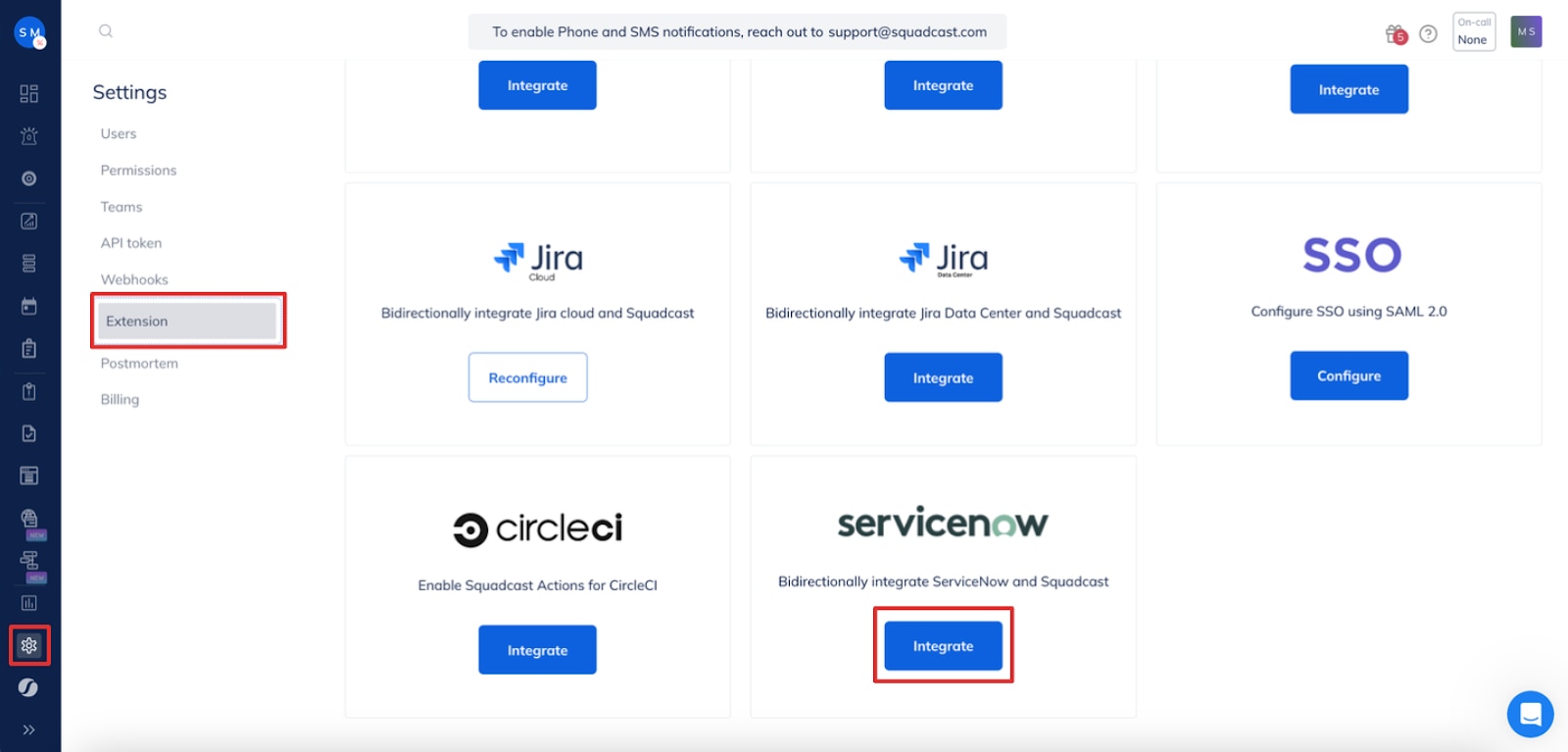
- Navigate to Settings > Extensions > ServiceNow > Click on “Integrate.”
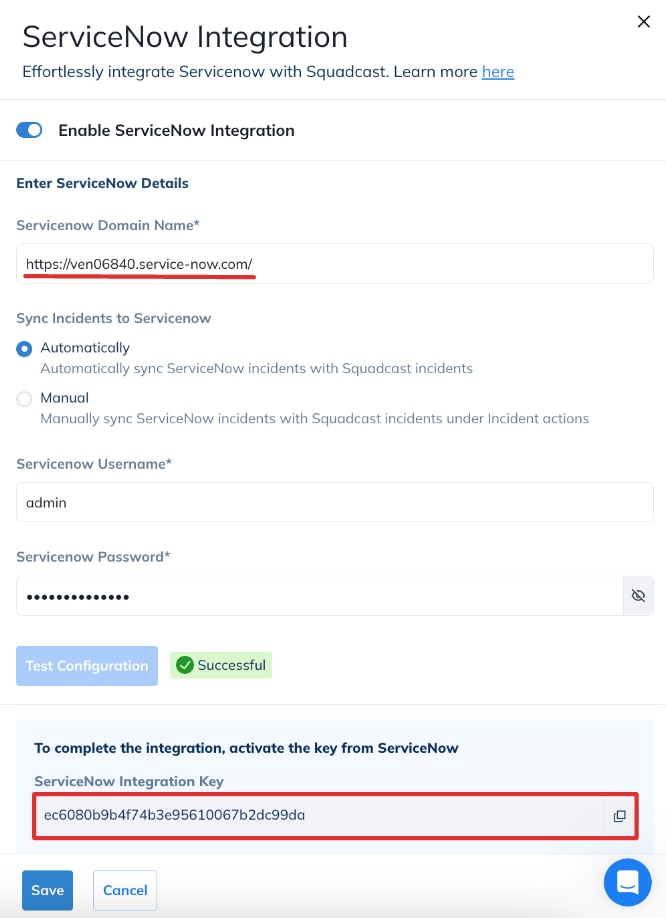
- Enter the ServiceNow domain name (e.g., instance_name.servicenow.com).
- Input the ServiceNow “username” and “password.”
- Choose the preferred method for creating ServiceNow Incidents for SolarWinds Incident Response Incidents – either automatically or manually.
- After entering all details, click on “Test Connection” to ensure correctness.
- Upon successful testing, copy the “Integration Key” and store it securely.
Step 4: Setting up ServiceNow
- Seamlessly integrate On-Call Management, Incident Response and SRE Workflows for efficient operations.
- Automate Incident Response, minimize downtime and enhance your tech teams’ productivity with our Unified Platform.
- Manage incidents anytime, anywhere with our native iOS and Android mobile apps.

SolarWinds Incident Response Details
- In the ServiceNow API config page, enter the “API token” of the SolarWinds Incident Response user and the user’s name.
- Input the “Integration Key” copied from SolarWinds Incident Response.
- Click on “Test Connection” to verify the entered details.
And there you have it – the initial setup for this bidirectional integration is now successfully completed. With this initial setup complete, there are numerous possibilities for what you can achieve. For further details on maximizing the potential of this integration, please refer to our documentation.
Conclusion
In summary, the ServiceNow-SolarWinds Incident Response integration offers a seamless solution for Incident Management challenges. By bridging communication gaps, synchronizing workflows, and providing unified experiences, this collaboration boosts the effectiveness of your Incident Response Teams. Embrace this powerful integration to elevate your Incident Management capabilities and stay ahead in today’s fast-paced environment. Give this new integration a spin with our 14 day free trial. If you encounter any issues or have questions, our support team is here to help.