ServiceNow is a workflow automation platform used by organizations for their IT ticketing and project management needs. In contrast, SolarWinds Incident Response is an end-to-end Reliability Workflow platform that is used by organizations for their Incident Management and reliability requirements. Now you can integrate ServiceNow and SolarWinds Incident Response to unlock benefits like optimizing time between incident detection and creation, reduced alert fatigue with Deduplication, real-time incident updates and providing granular alert routing capabilities to your on-call team.
If your organization reports incidents by creating ServiceNow tickets but uses SolarWinds Incident Response for incident management, then you can use ServiceNow as a frontend for reporting incidents too.
In this Integration blog, we look at how SolarWinds Incident Response and ServiceNow can work together with minimal investment in tools and training. We will also explore two common use cases where SolarWinds Incident Response and ServiceNow integration can be leveraged.
The first use case involves organizations that use ServiceNow to keep track of infrastructure outages. The second use case is valuable for organizations that are using ServiceNow boards for product/project management. These use cases will utilize the following integration methods:
- ServiceNow to SolarWinds Incident Response (via ServiceNow Alert Source integration in SolarWinds Incident Response)
- SolarWinds Incident Response to ServiceNow (via Outgoing Webhooks with Webhook Connectors)
Use Case1: How Support Teams will benefit by integrating ServiceNow with SolarWinds Incident Response
This use case is relevant for those organizations that use monitoring tools to send notifications to their L1 support team via email, Slack or other tools. Organizations that are using ServiceNow for ticketing, need to manually assign tickets to support teams based on severity. This makes the quick resolution of issues difficult. The integration with SolarWinds Incident Response solves this problem.
By integrating ServiceNow with SolarWinds Incident Response, the following things are possible:
- Custom tags can be defined for each ticket created in Servicenow, allowing for 24/7 on-call support. Depending on the severity, ServiceNow can send alerts to L1/L2 support as needed.
- Customizing escalation policies in SolarWinds Incident Response is now possible based on the nature of the issue.
- Since ServiceNow tickets generate open/unacknowledged incidents, SolarWinds Incident Response routing rules (based on custom tags) can ensure that severe incidents are routed to appropriate on-call engineers.
- ‘SolarWinds Incident Response Analytics’ (incident heat maps and charts) lets you quickly identify problematic services in your infrastructure over a time period.
Once the support engineer receives a notification about the issue, he creates a ticket in ServiceNow. With the integration, an incident is automatically created in SolarWinds Incident Response which is then left in an unresolved/open state. When the incident is resolved in ServiceNow, it gets marked as resolved in SolarWinds Incident Response too.
Follow the steps below to integrate SolarWinds Incident Response and ServiceNow.
- Search for “Business Rules” in the filter box. Click on System Definition to access Business Rules.
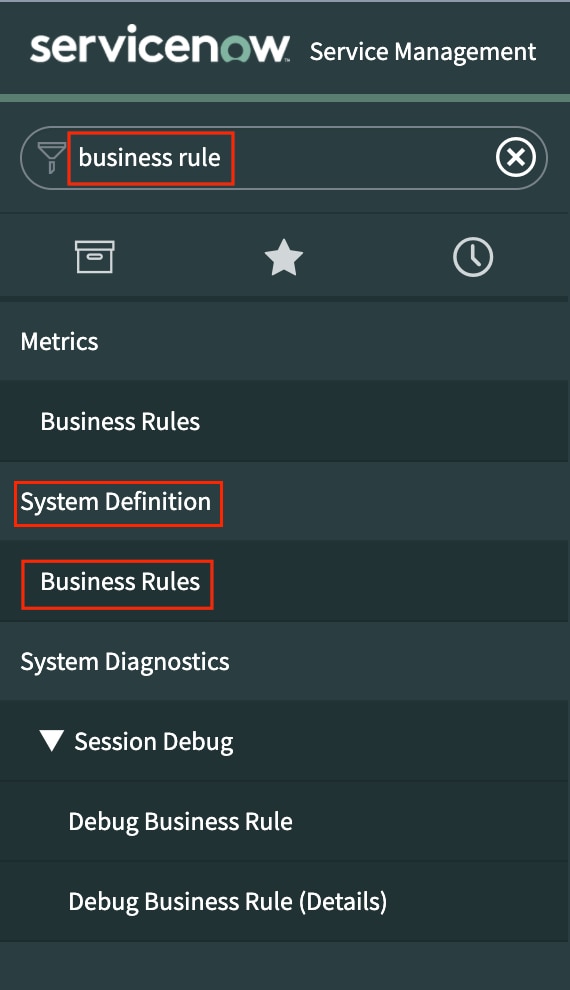
- Select Incident from the drop-down menu, and check the Advanced button. Click on New


- In the When to run tab fill the form as shown in the screenshot below
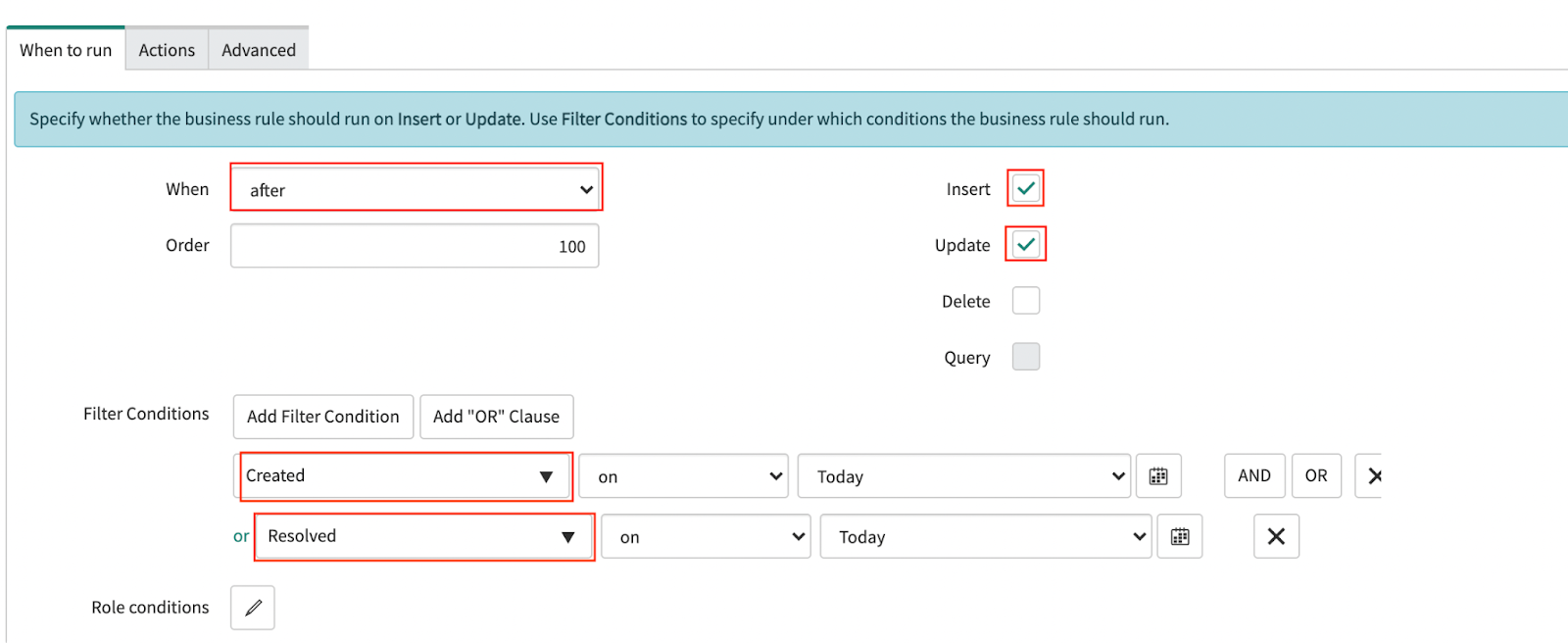
- Replace <SolarWinds Incident Response Webhook URL> with alert source endpoint webhook URL and click on Submit. (To copy the SolarWinds Incident Response webhook URL refer to Step 2 of this documentation page.)
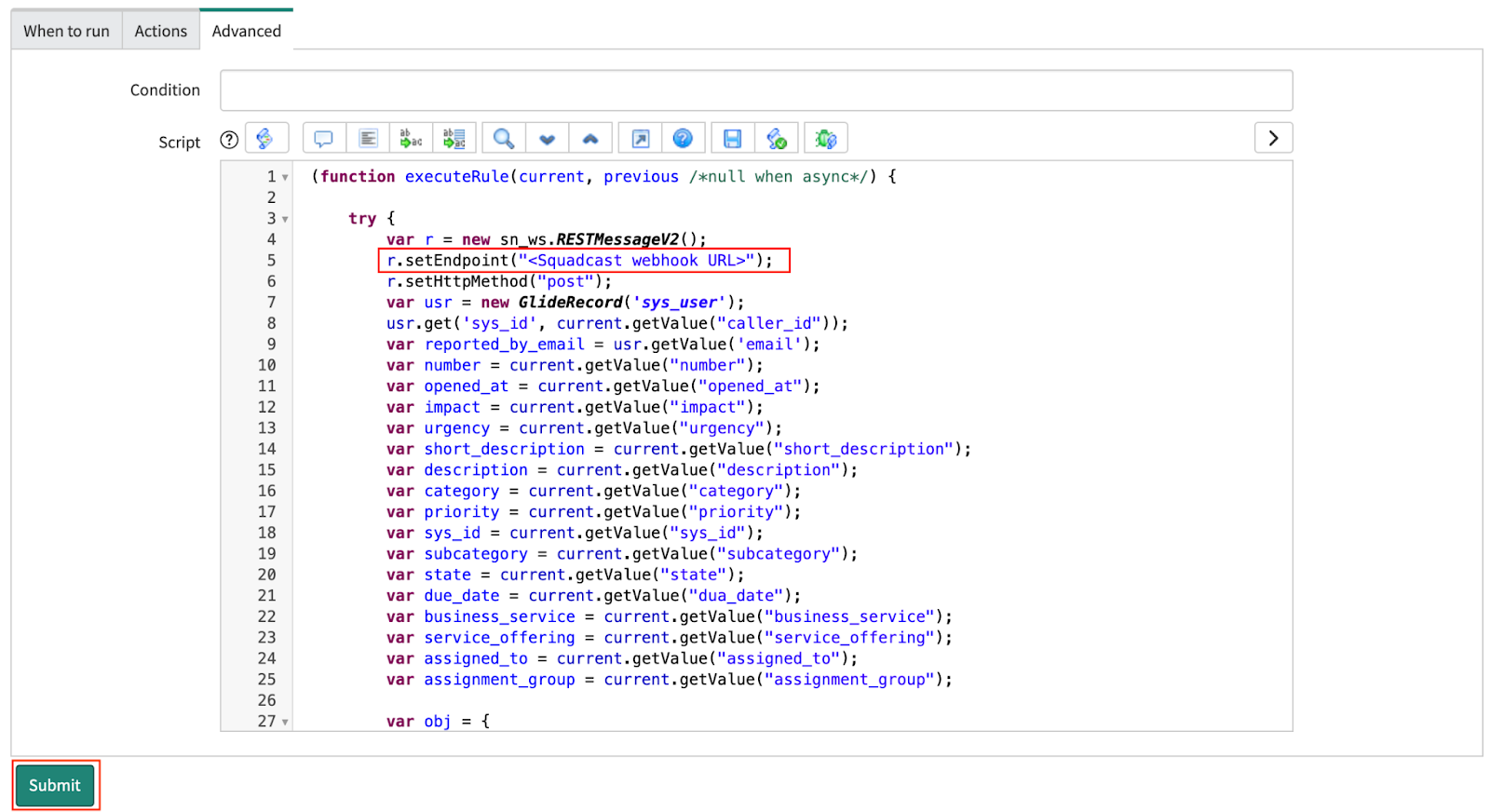
For more information on this integration, you can have a look at our documentation.
Use Case2: Creating tickets in ServiceNow when incidents are reported in SolarWinds Incident Response
Some organizations use ServiceNow for tracking to-dos, backlogs and other issues throughout the lifecycle of a product. Organizations often deal with bugs during the development process. Once these bugs are fixed, their status needs to be manually updated on ServiceNow project boards. This process goes on throughout the development lifecycle. With the SolarWinds Incident Response integration, this process can be automated.
With the help of SolarWinds Incident Response’s outgoing Webhooks and Webhook connectors, you can create a ticket/action item in ServiceNow when an incident is triggered in SolarWinds Incident Response. (Read more about webhooks)
Status sync: Some organizations use the ServiceNow project board to keep track of their product development status. With SolarWinds Incident Response status sync, you can keep tabs on the development and maintenance of a product, during specific sprint cycles in the ServiceNow project board. When an issue is being fixed in production, status sync allows you to get real-time updates on the progress made.
For more information on how to set up outgoing webhooks you can refer to the screenshots below:
- Navigate to Settings > Webhooks. Click on the + icon
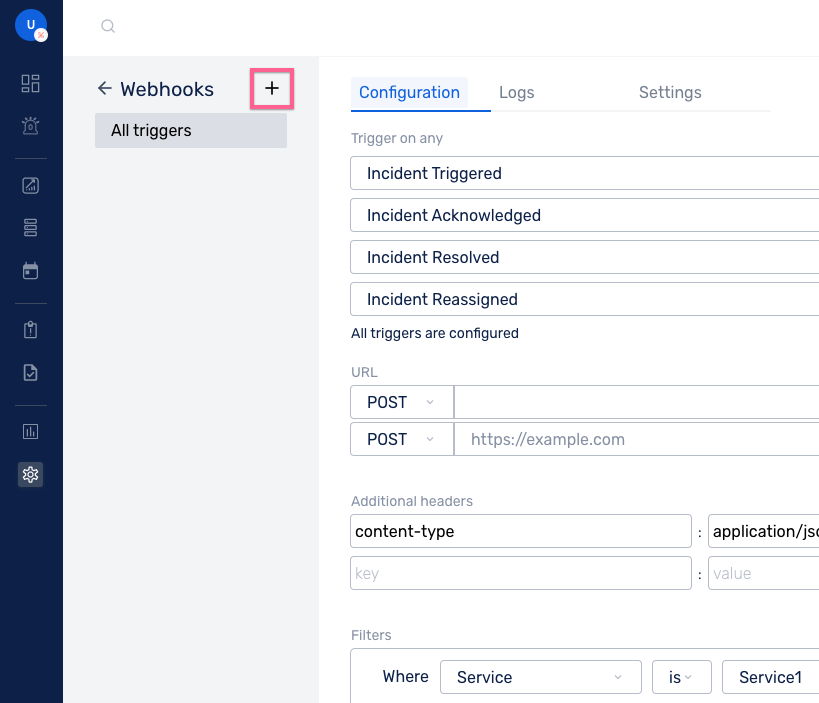
- Enter a suitable name for the webhook and then click on Create
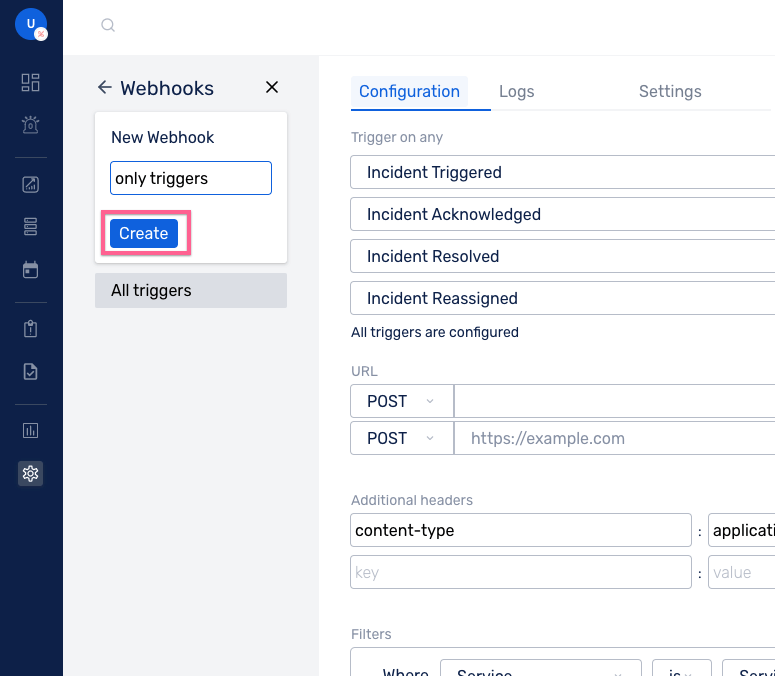
For a webhook, you may specify several triggers. If any of the triggers match, information is delivered to the given URLs. Other triggers you can choose are:
- Incident triggered
- Incident reassigned
- Incident acknowledged
- Incident resolved
For more information on outgoing webhooks you can have a look at our documentation.
There are certain organizations that use ServiceNow for IT ticketing support and tracking project lifecycles. In this situation, organizations will benefit from both these integration methods used in above use cases.
Conclusion
As your needs grow, you can use the bidirectional integration with ServiceNow to track performance, document incident reports for compliance needs, and streamline your existing on-call process.
SolarWinds Incident Response automatically captures information about each incident (time taken to resolve/acknowledge etc.), hence you can track the performance of your on-call support teams over a period of time. It simplifies the documentation of postmortems and helps identify infrastructure issues more effectively.
For organizations that have already invested in ServiceNow and do not wish to move away from it, they can integrate SolarWinds Incident Response into their workflow and reap the benefits of a feature-packed SRE platform.
- Seamlessly integrate On-Call Management, Incident Response and SRE Workflows for efficient operations.
- Automate Incident Response, minimize downtime and enhance your tech teams’ productivity with our Unified Platform.
- Manage incidents anytime, anywhere with our native iOS and Android mobile apps.