Alert noise is a common problem for IT teams that monitor and manage complex systems. Excessive unactionable alerts triggered by various sources, such as applications, servers, network devices, etc., can cause alert fatigue. The higher volume of alerts can be overwhelming, reducing the ability to respond to critical alerts.
One event of possible alert noise is during scheduled maintenance, awhich is a common practice in the digital realm.
Problems at Hand
Maintaining operational continuity is non-negotiable. Here are a few common use cases that demonstrate the challenges of alert noise faced during scheduled maintenance.
- Proactively muting all alerts from specific sources like Datadog.
- Muting Specific alerts from monitoring tools like Prometheus, Datadog, or New Relic while enhancing API sets.
- Suppress a high volume of alerts while conducting load testing on a web application or server.
- Known anomalies or irregularities in certain systems or processes that generate alerts.
Suppression Rules
SolarWinds Incident Response’s suppression rules offer granular control for muting alerts from various sources. You can use these rules to focus on maintenance tasks without getting overwhelmed by unactionable alerts. They can be applied to entire services, multiple alert sources, specific variables, or combinations to suit your needs.
How To Configure Suppression Rules?
You can suppress unwanted alerts with Alert Suppression.
- Every service in SolarWinds Incident Response supports Alert Suppression allowing you to create suppression rules by choosing an alert source or a host and add conditions to suppress alerts by time.
- The ‘time’ in this case will be the maintenance window you’ve anticipated for your maintenance.
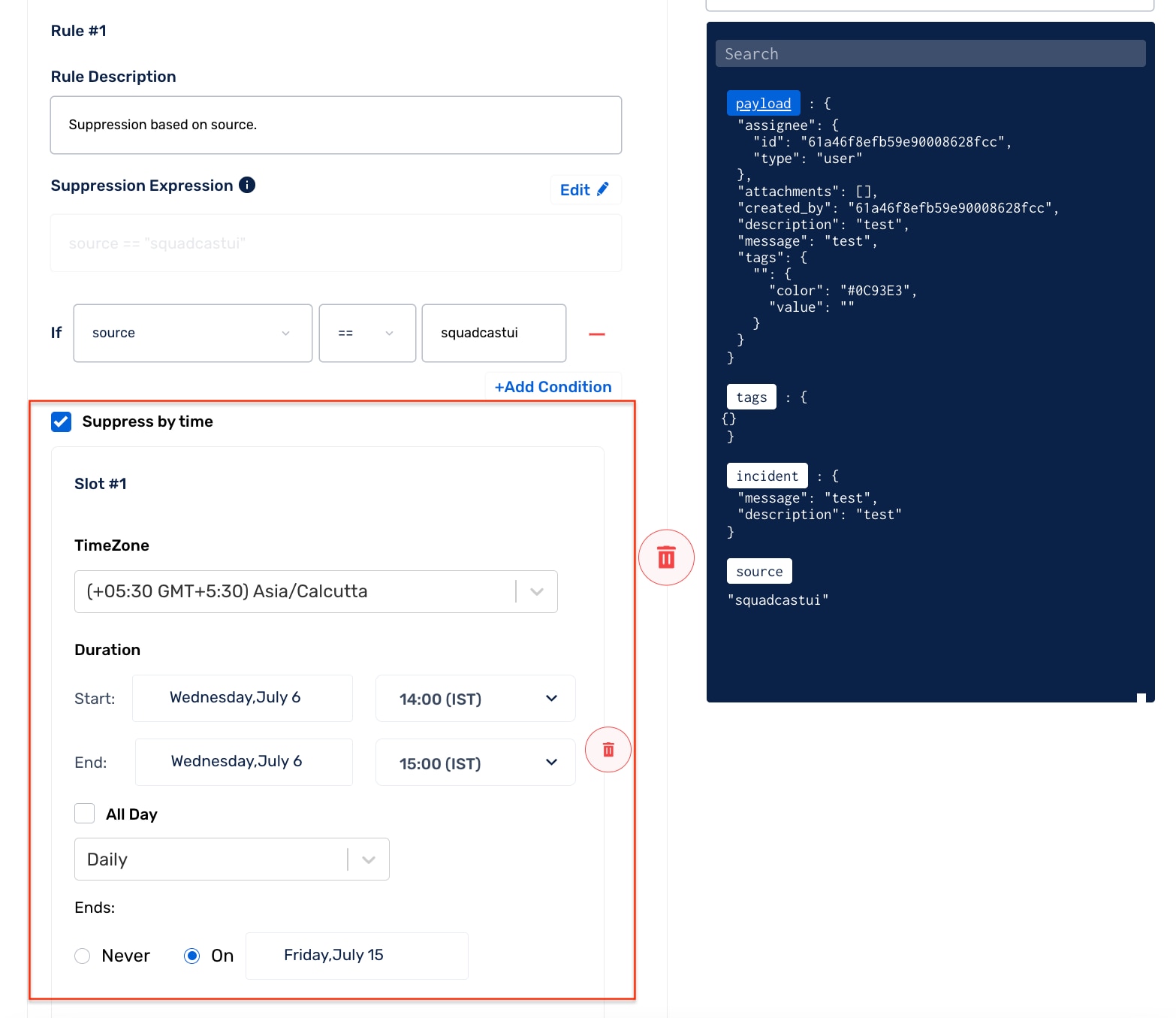
- Within the service, if you receive notifications from a selected alert source for the set period, the alert notifications shall be suppressed.
- If you are aware that the payload contains variables specific to the API currently being worked on, you have the option to employ a suppression rule that targets that particular API, allowing you to temporarily suppress alerts of that nature.
- Similarly you can add new conditions and rules. This is an efficient way to control alert noise when you’re running maintenance at your end.
- Host-specific suppression ensures that your monitoring process for the rest of the system remains intact and unhindered.
Impact: Alert Suppression leads to alert noise reduction during maintenance ensuring you receive only important alerts. However, it’s important to note that
- Suppressed incidents cannot be acknowledged, reassigned, or resolved.
- Post mortems are not available for suppressed incidents.
- Further customization and configuration of your suppression rules can be done using REST APIs.
For more information, explore the short video on suppression rules & configuration options for alert suppression and maintenance mode in SolarWinds Incident Response.
Conclusion
Any downtime or disruption can have a ripple effect on your business. But what happens when you need to make improvements or perform maintenance on a specific part of your infrastructure without causing unnecessary alert noise?
SolarWinds Incident Response offers a practical solution through automation rules, specifically suppression rules. These rules allow you to gain granular control over alert noise during maintenance periods without sacrificing overall system monitoring.
So, you can now create an environment that promotes focused Incident Response and facilitates an enhanced Incident Management experience.
- Seamlessly integrate On-Call Management, Incident Response and SRE Workflows for efficient operations.
- Automate Incident Response, minimize downtime and enhance your tech teams’ productivity with our Unified Platform.
- Manage incidents anytime, anywhere with our native iOS and Android mobile apps.