

MySQL tuning is rarely a lack of data; it’s an excess of noise.
The inherent difficulty in optimizing a MySQL or Percona environment lies in the balance between effort and risk. First, you identify a query with high latency. Next, you run an EXPLAIN. If the plan shows a large amount of read work returning only a small number of rows, that is a classic sign of inefficient data access.
The solution seems obvious: add an index. But in a production environment, “obvious” can be dangerous. An index that solves one read-heavy query might cripple write performance on a high-velocity transactional table. This fear of causing regression often paralyzes DBAs, leaving inefficient queries to consume resources unchecked.
We need to stop fixing isolated queries and start optimizing tables. The Table Tuning Advisor in Database Performance Analyzer (DPA) bridges this gap, transforming raw execution data into safe, actionable intelligence.
Identify Inefficiency at Scale
Optimization begins with aggregation. Looking at a single slow query is tactical; looking at the total workload against a table is strategic.
DPA aggregates wait times and workload metrics to identify which tables are the primary contributors to database stress. In other words, we don’t just flag long-running queries; we surface the specific tables where the inefficiency originates.
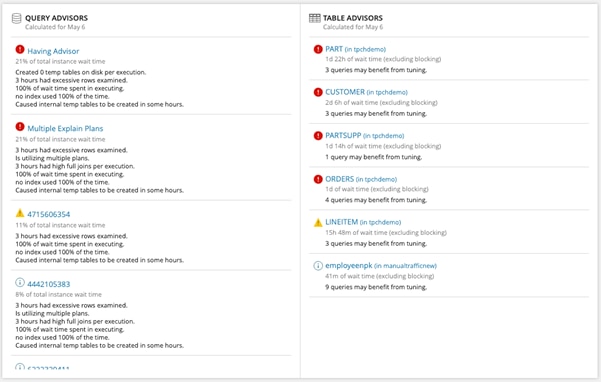
By ranking tables based on their contribution to total wait time, you can prioritize architectural changes that yield the highest ROI for the system as a whole, rather than micro-optimizing a query that runs once a day.
Isolate the “Producer Step”
Execution plans can be difficult to analyze manually, especially when you’re trying to determine which part of the plan is actually driving unnecessary work. To help, DPA identifies inefficient producer steps in the explain plan using a proprietary algorithm.
In DPA, producer steps are the plan steps that read data for later processing by downstream consumer steps. In practice, these are often full table scans or full index scans that examine far more rows than the query ultimately needs.
Even when a later step such as a sort appears expensive, that cost is often a downstream effect of a producer step reading too much data up front. That’s why DPA surfaces inefficient producer steps as a useful starting point for tuning.
Instead of manually dissecting the full plan, DBAs can quickly see where the engine is doing disproportionate work. From there, they can evaluate whether the right fix is a new index, a modified index, updated statistics, or a query rewrite.
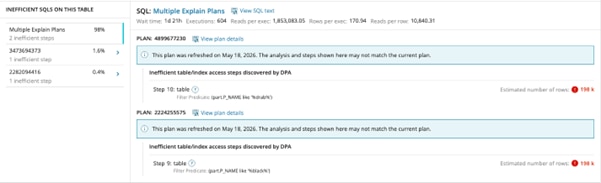
If an inefficient producer step is reading far more rows than the query ultimately needs, downstream operations such as joins, sorts, and aggregations have to process more data than necessary. Therefore, DPA highlights these steps so DBAs can focus first on the part of the plan most likely to be driving excess work.
The Critical Context: Table Churn
This is where most tuning tools fail, and where DPA provides essential context. Knowing what to index is easy; knowing if it’s safe to index is hard.
If a table is read-heavy but write-light, a covering index can be a strong option. However, if that table is subject to massive write pressure, adding an index increases the overhead for every INSERT, UPDATE, and DELETE.
DPA calculates Table Churn, the volume of data modification activity on the table.
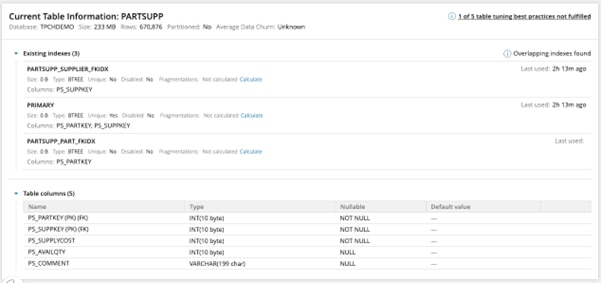
The Table Tuning Advisor visualizes this churn alongside existing indexes and related table/index context.
For the DBA: This provides the safety verification needed to approve changes. You can see immediately if a table is too volatile to support additional indexing without risking write-latency regression.
For the Developer: This validates query design. It forces a conversation about why a high-churn table is being queried inefficiently and whether the schema supports the access pattern.
Conclusion
Stop dissecting execution plans by hand and guessing at the impact of your indexes. The Table Tuning Advisor moves you from reactive troubleshooting to proactive optimization by aggregating workload data and contextualizing it with table churn.
Analyze the Producer Steps causing bottlenecks.
Evaluate the risk using Churn metrics.
Optimize with confidence.
FAQ
What does Table Tuning Advisor do?
Table Tuning Advisor helps identify tables with inefficient workloads by aggregating information about the table, the inefficient queries that ran against it, and any existing indexes.
Which database platforms support table advisors in DPA?
Table advisors are available for Oracle, SQL Server, Azure SQL DB, PostgreSQL, MySQL, and Percona database instances.
How often are table advisors generated?
Index and table advisors are calculated once a day, at the end of the day. The most recent index and table advisors are for the previous day.
Why is table-level tuning more useful than focusing on one slow query?
Table-level tuning helps you see aggregated wait time, inefficient queries, and indexing context in one place. That makes it easier to prioritize changes with broader performance impact.
Further SolarWinds Resources
Ready to improve your database performance? Get started with the DPA Table Tuning Advisor documentation.